What is Posit Connect? How Does It Support Data Science Teams?
- What Posit Connect is and how data science teams use it
- The system architecture and components that system administrators need to manage
- The types of content that will be deployed to your Posit Connect instance
- How users will publish content to your Posit Connect installation
- Reading time: 15 minutes
- Documentation reading time: 15 minutes
- Hands-on exercise time: 0 minute
Not all the features described in this training might be available in your product tier. Check with your Customer Success Manager if you have any questions.
Overview of Posit Connect
This 2.5 minute video provides an overview of Posit Connect.
How do Data Science teams use Posit Connect?
As a system administrator, understanding how data science teams use Posit Connect helps you anticipate their needs and address potential challenges. Your responsibilities will include ensuring the system is properly configured, managing user access, and maintaining the infrastructure that supports these data science workflows. This knowledge also enables more effective communication with data science teams when troubleshooting issues or planning system updates.
Posit Connect provides a common platform for data teams to deploy, manage, and share data, models, and dashboards. It makes it easier for teams to collaborate and share insights from data. Connect supports a wide range of tools to share data science content from R, Python, and the NodeJS ecosystems.
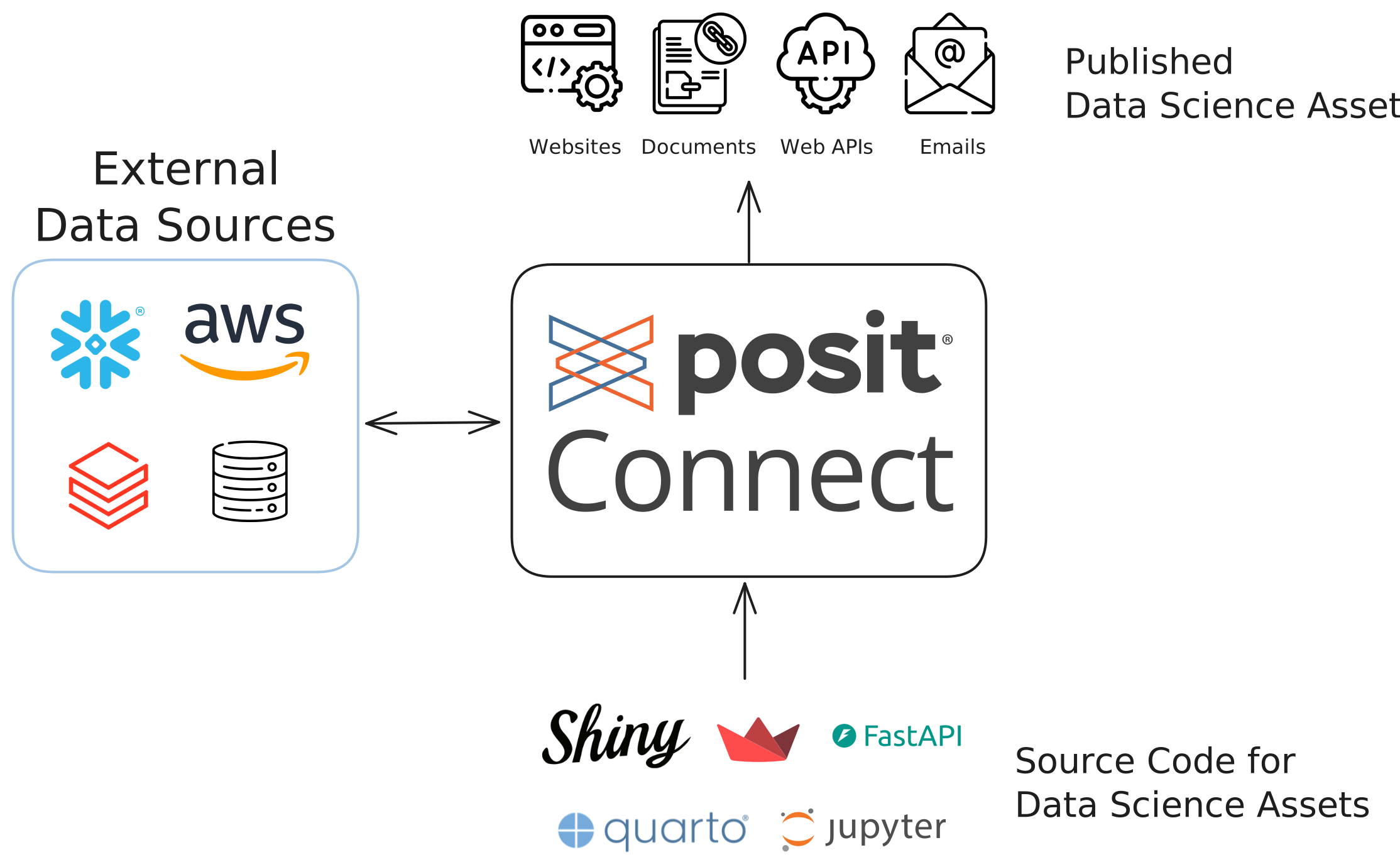
With Posit Connect, the content can use data sources hosted on premises, or in the cloud like on AWS, Snowflake, or Databricks. This direct connection to the data makes it easier to share insights and iterate using the most recent version of the data.
Connect provides a secure platform for data science teams. It integrates with your enterprise authentication systems to control who has access to what data and resources. Posit Connect provides a secure way for data scientists and analysts to publish their work without depending on other teams for deployment.
Examples of how Connect is used
Shiny applications are a popular way to create interactive web applications, including dashboards, using R or Python. If you are not already familiar with Shiny, you can explore an example of a Shiny application deployed on Posit Connect.
If you want to learn more about how Posit Connect delivers value to some of our customers, you can explore some success stories.
What can be hosted on Posit Connect?
Being familiar with the type of content your users publish on Connect will help you when troubleshooting or when deciding on the hardware requirements needed to host your Connect installation.
Posit Connect supports the publishing of four types of content:
Static content (Content with no server component: static web pages, PDF documents, etc.) – Connect can serve static content. These documents do not have to be rendered by Connect, they can be generated in other environments and only the output is published on Connect.
System impact: These have minimal resource requirements since no processing occurs on the server.
Rendered content (Content with no server component: Quarto, RMarkdown, R or Python scripts, Jupyter Notebooks, etc.) – In this case, authors deploy to Connect the source code of their content along with a description of the required environment, and Connect takes care of generating the output and making it available.
System impact: These require computing resources during rendering, which may happen on schedule or on-demand.
Interactive content (Content that requires a server to run: Shiny, Streamlit, Dash, Bokeh, Gradio, Jupyter Voilà) – Posit Connect can host diverse web frameworks commonly used in data science that allow users to interact with the data.
System impact: These consume memory and CPU resources for as long as users are actively using them. The number of concurrent sessions for interactive content will determine the hardware requirements for your server.
Web APIs (Plumber, FastAPI, Flask, etc.) – With Posit Connect you can host web APIs to query datasets or get predictions from a model, for instance.
System impact: These run when called and your system may need to handle concurrent requests. Their resource requirements will depend on the tasks performed by the API calls.
Posit Connect Architecture Overview
Being familiar with the different components that make up Posit Connect will help you set it up properly and maintain it effectively within your existing infrastructure to provide the best experience for its users.
To render and deploy the content from code-first data products, Posit Connect includes several components that may need to be configured by the admins:
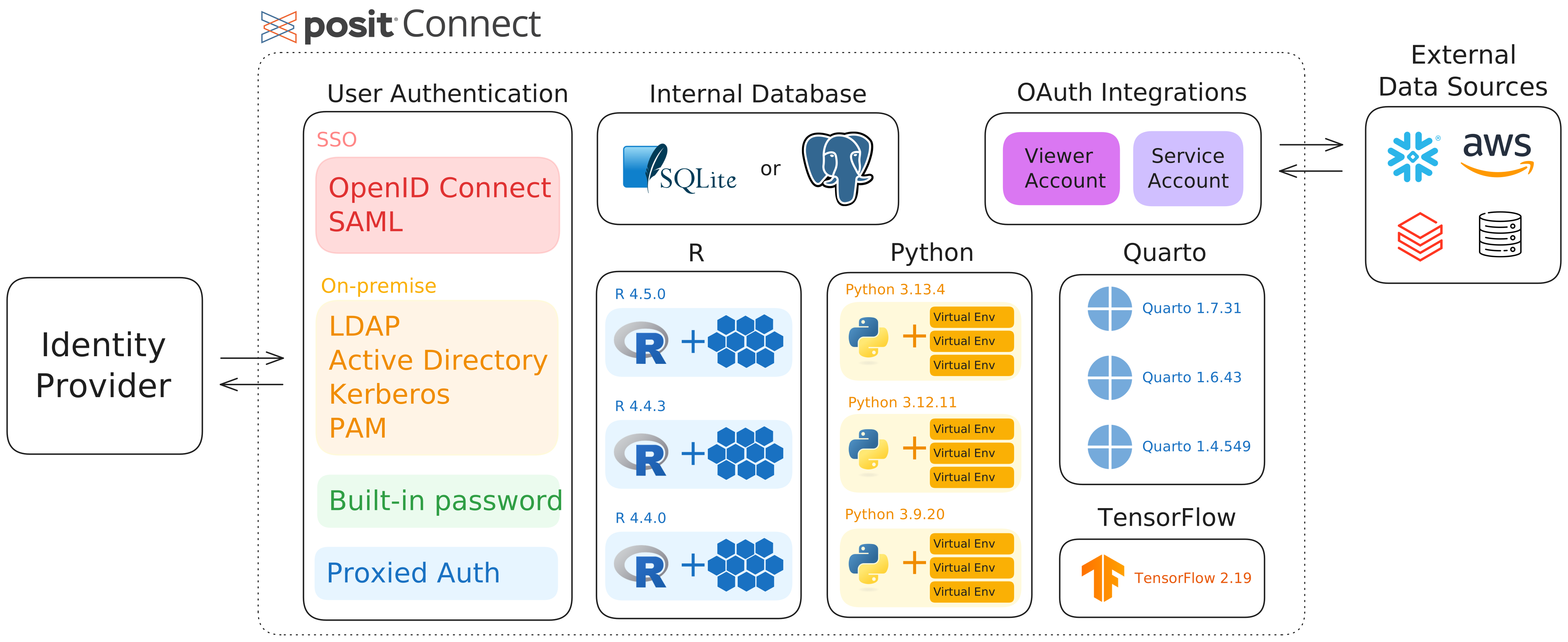
Internal database – Stores metadata about users, content, and system configurations needed for Connect’s operation using SQLite (or PostgreSQL for more robust or complex setups).
Authentication system – Integrates with many systems commonly found in enterprise settings including SSO with OIDC or SAML, LDAP, or Active Directory. The authentication system controls who has authorization to publish and/or view applications.
Execution environments – Renders or runs the content published on Connect. As the admin, you will need to install the versions of R, Python, Quarto, and NodeJS that application developers use. When developing content, developers rely on packages or libraries to extend the functionalities that come natively with these languages. Each piece of content published on Connect captures these required dependencies. Connect takes care of installing and managing the environments needed by these applications. As an admin, you can set up the repositories used to retrieve these dependencies (see callout below).
External data integrations – Provides OAuth integrations with external cloud providers such as AWS, Azure, Snowflake, Databricks, GitHub, Google BigQuery, and others. Posit Connect supports two OAuth authentication types:
- Viewer Authentication: Connect can impersonate logged-in users and control access to data sources, providing a personalized experience based on the individual user’s privileges. This authentication type supports interactive content only (e.g. Shiny or Streamlit).
- Service Account Authentication: Connect can access external data sources using a centralized service account identity, providing consistent access for all users without managing API keys. This authentication type supports both interactive (e.g., Shiny) and rendered content (e.g., Quarto).
These OAuth integrations use short-lived access tokens with limited permissions, which is more secure than embedding long-lived credentials in published content such as API keys in environment variables.
Developers of R and Python applications rely on libraries or packages to extend the native functionalities of these languages. These extensions are downloaded from repositories.
For R, the two most popular public repositories are CRAN (the Comprehensive R Archive Network) and Bioconductor. The former is a generalist repository, while the latter specializes in the analysis of biological data.
For Python, PyPI is the main repository.
Posit Connect can be installed on a single server or on multiple servers (High-Availability or Load Balancing setups). With the “Advanced” license tier, Connect can also be configured to use off-host execution where environments are built and content is executed in containers using Kubernetes.
In the next chapter, we will go through the installation of Connect. Before this, read the following sections to become familiar with the different configuration and their requirements:
Getting content on Posit Connect
There are three main ways developers of data products are able to publish their content on Posit Connect:
Push button: RStudio, as well as VS Code and Positron (after installing the Posit Publisher extension), allows data scientists to push Shiny apps, Quarto content, and more from the IDE to Connect. This approach allows developers working by themselves on a project to publish their content with minimal setup.
Git Integration: Posit Connect can watch Git repositories and update the content by regularly polling the repository for changes. For teams collaborating on content with Git, it is a robust method to deploy content and can be set up to have staging and production versions of their content.
Web API: Posit Connect provides a web API to manage many aspects of the application, including publishing content. Posit provides a Python SDK and an R package to make it easier to interact with the API. These tools can be used in CI/CD pipelines to automatically deploy content to Connect only when the integration checks are successful.
Content Automation
Posit Connect can execute content on schedule, which has important implications for system administrators:
Scheduled execution – Reports and analyses can run automatically on a defined schedule (e.g., daily, hourly). For example, a sales dashboard might update every morning with the previous day’s data. As an administrator, you may want to use the monitoring features in Connect to coordinate with your users to determine the best times to run these reports based on resource usage. For instance, some scheduled reports can run at night when there is little interactive use.
Email distribution – Connect can automatically email rendered content to stakeholders. For instance, weekly performance reports can be generated and emailed to department heads without manual intervention. As an administrator, you will need to configure email server settings and monitor delivery performance.
Key points for this section
- Posit Connect is a platform for deploying, executing, and sharing code-first data science content created with R and Python
- Connect integrates with enterprise authentication systems and handles user permissions
- It manages the execution environments for content, installing required R/Python packages automatically
- Content can be published via Git integration, directly from IDEs, or through the web API
- Connect provides secure OAuth integrations with external data sources like AWS, Snowflake, and Databricks
- It enables content automation with scheduled execution and email delivery of reports
Check your understanding
- What is the primary purpose of Posit Connect and what types of content can it host?
- How do data scientists publish their content to Posit Connect?
- What are the two types of OAuth authentication for integrations supported by Posit Connect and when would you use each?
- What capabilities does Posit Connect provide for automating content delivery?
Make note of all the questions you might have after reading this chapter, and bring them to your office hours.
Next Steps
In the next chapter, you will install Posit Connect on a virtual machine. Before this, take some time to reflect about what you have learned in this chapter and how it applies to the installation on your infrastructure.
After going through this section, can you answer these questions?
- What are the Connect features that your end users want?
- Do you need to speak to other teams (Security, Networking, etc) before installing or configuring this product?
- What questions do you have about the features or functions of this product?