Data Access Management
In this section, you will learn to:
- Identify scenarios where content requires external data access
- Select appropriate authentication strategies for different use cases
- Configure common data access patterns (DSN, OAuth, environment variables)
- Diagnose and resolve connection issues
Content on Posit Connect runs differently from how scripts are executed on Workbench or in a local development environment. By default, content is run by a service account with minimal permissions and access. Therefore, data access must be intentionally configured by developers and/or server administrators. In this chapter, you will learn about data access strategies for Posit Connect, including how to balance security requirements with developer productivity while ensuring your deployed content can reliably access the data sources it needs.
- Reading time: 20-25 minutes
- Documentation reading time: 25-45 minutes
- Hands-on exercise time: 30-45 minutes
Understanding Data Access in Posit Connect
Data Inside vs. Outside Content Bundles
When deploying content, developers can include their data as files inside the content bundle and access it with a relative path. However, this approach has limitations:
- Deployment coupling: Data and code must be deployed together
- Update frequency: Data can only be refreshed when content is redeployed
- No sharing: Data cannot be shared across projects without duplication
- Storage overhead: Increases server disk space usage
For instance, if you are building a dashboard as a Shiny app of sales data, and the sales data is updated monthly, then including the data in the content bundle makes sense. The developer can update the data and deploy the new version of the app at the same time. However, if the sales data is updated daily, then including it in the content bundle would not be appropriate because it would require daily deployments of the app. Additionally, if you also have a report that uses the same sales data, you would need to duplicate the data in both content bundles. In other words, if the data needs to be refreshed more often than the code is deployed, or needs to be shared across projects, then external data access is the better approach.
Decoupling the content from the data ensures that the data is up-to-date and the same data can be re-used for different contents. Setting up access to external data sources requires additional configuration by developers and/or server administrators, but provides more flexibility and scalability.
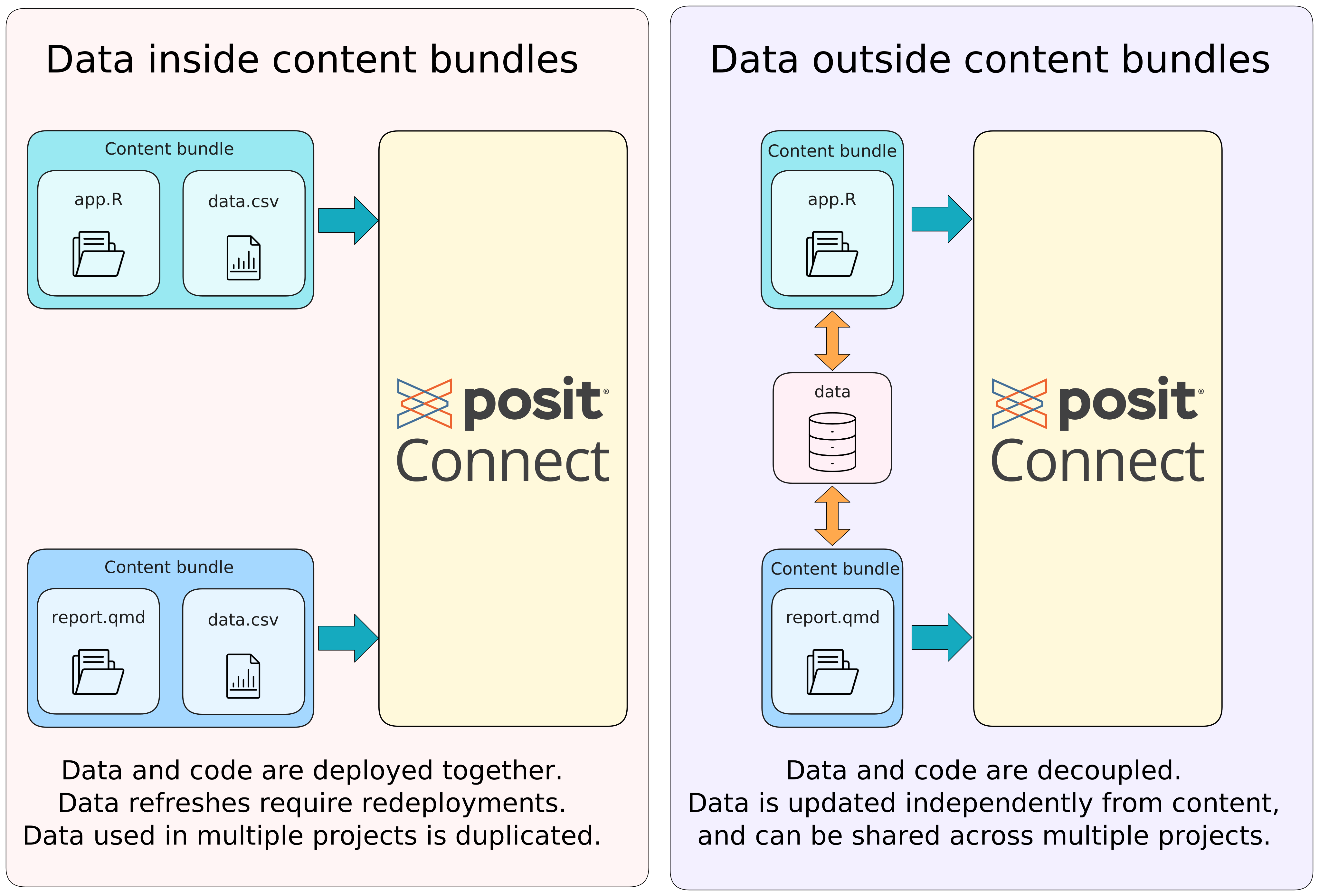
In the rest of this section, we will explore how content deployed on Posit Connect can access data stored outside the content bundle. Both R and Python provide ways to connect to a wide variety of data sources.
Your data science teams work iteratively: they develop using sample data before deploying to production where they need access to full datasets. Understanding data access patterns helps you:
- Anticipate their needs before they encounter deployment issues
- Provide self-service options that balance security and productivity
- Troubleshoot connection problems more effectively
The Three Key Decisions
When setting up external data access, you need to make three key decisions:
- What data source? (Database, cloud storage, data lakehouse, pins, file system)
- Who authenticates? (User credentials vs. service account)
- How are credentials managed? (OAuth, DSN, environment variables, etc.)
These decisions interact with each other: some data sources may only support specific connection methods or authentication types, some use cases require data to be in a specific format, or security policies may mandate certain authentication strategies.
As an Admin of a Posit Connect server, you will need to communicate with your developers to understand the data sources they will be using and how they will be using them, so you can configure the server to provide easy and secure access to those data sources.
While this section is not about helping you choose the most appropriate data source for your use case, understanding data access is important to make an informed decision. There are however additional factors to consider when choosing a data source, such as: how frequently the data is updated, the size of the data, the performance requirements, and the security and compliance requirements.
Choosing Your Authentication Strategy
User Credentials vs. Service Accounts
The first critical decision is whether data access should be done on behalf of individual users or through a shared service account.
User-level credentials provide the most granular control and security. Users can only see data they are authorized to access, even if the query attempts to retrieve unauthorized data. This is common in systems like Databricks and Snowflake with strong data governance models.
Service account credentials are shared across users accessing the content. While easier to administer, they reduce granularity of data governance and auditing, as all actions are attributed to the shared account rather than individuals.
| Factor | User Credentials Recommended | Service Account Recommended |
|---|---|---|
| Data sensitivity | High | Low |
| Personalization needs | User-specific views required | Same view for all users |
| Audit requirements | Individual accountability needed | General usage tracking sufficient |
| Maintenance overhead | Higher (user onboarding/offboarding) | Lower (single account to manage) |
| Content type | Interactive dashboards | Static reports, scheduled jobs |
| Compliance requirements | Strict data governance | Standard security practices |
General recommendation: User credentials are preferred when possible, as they provide better security and ensure viewers only see data they’re authorized to access. Service accounts are appropriate for automated processes, scheduled reports, or when all users should have identical data access.
This document uses “service account” in two related but distinct ways:
Database service account: A shared database user (e.g.,
app_readonly) whose credentials are stored in a DSN or environment variables. Multiple content can share these credentials, and they appear as the same database user. See Pattern 1 below.Linux service account user: A dedicated Linux user account on the Connect server (configured via
Applications.RunAs) that runs specific content. This controls file system permissions. This Linux service account user can have its own user-level DSN stored in their home directory (~/.odbc.ini).
These can be combined: content running as a Linux service account user can connect to a database using either a system-wide DSN (shared credentials) or a user-level DSN (credentials specific to that Linux user).
Credential Lifetime Considerations
The second dimension is how long credentials remain valid:
- Long-lived credentials (usernames/passwords, personal access tokens) are usually easier to manage. To limit risk in case they are compromised, they should be scoped appropriately. It is also recommended that these credentials expire periodically and be rotated. With long-lived credentials, you must also think about where to store them (see next section).
- Short-lived credentials (OAuth tokens) provide better security but require more complex configuration, and interactive token refresh. They are generally not as suitable for automated processes, unless using service account tokens.
Where Credentials Live: Understanding Scope
Beyond deciding whose credentials to use, when dealing with long-lived credentials, administrators must also decide where those credentials are stored. This impacts the users, service accounts, or application that have access to them. The scope of credential access has significant security implications.
Content-level environment variables are the most restrictive option. Each content item has its own encrypted secrets, configured through the Connect dashboard’s Vars panel or through the Connect API. This is ideal when:
- Different applications need different database credentials
- Publishers need autonomy to manage their own secrets
Server-wide environment variables provide the same credentials to all content. Configure these in the Connect process supervisor script. This is appropriate when:
- All content should access the same shared resources
- You want centralized credential management
- Credentials are low-risk (e.g., read-only access to non-sensitive data)
DSN configuration follows similar scoping rules. A system DSN in /etc/odbc.ini is available to all content, while a user-level DSN in ~/.odbc.ini is only available to content running as that specific Linux user.
OAuth Integrations in Posit Connect
Posit Connect provides OAuth integrations for deployed content, offering ephemeral tokens for secure data access. Content can use either:
- Viewer’s individual credentials: Ensures personalized data access based on user permissions
- Service account credentials: Provides consistent access for all viewers
In both scenarios, secrets are kept out of application code. Integrations are available for:
- Data lakehouses: Databricks, Snowflake
- Cloud platforms: AWS, Azure, Google Cloud
- Other services: GitHub, Salesforce
- Custom OAuth providers
Common Implementation Patterns
Below we provide an overview of common data access patterns that can be configured in Posit Connect, along with when to use each pattern. This list is not comprehensive, it is a sample of common patterns to help you understand how data access can be configured in Posit Connect.
Pattern 1: Database Service Account
When to use
- Scheduled reports and dashboards
- All users should see the same data
- Data is updated automatically independently of the content
Setup overview
- Install Posit Professional ODBC Drivers on Connect server
- Configure DSN with service account credentials
- Developers reference DSN in their code
Authentication Flow Example
Figure 2 below illustrates the authentication flow for this pattern.
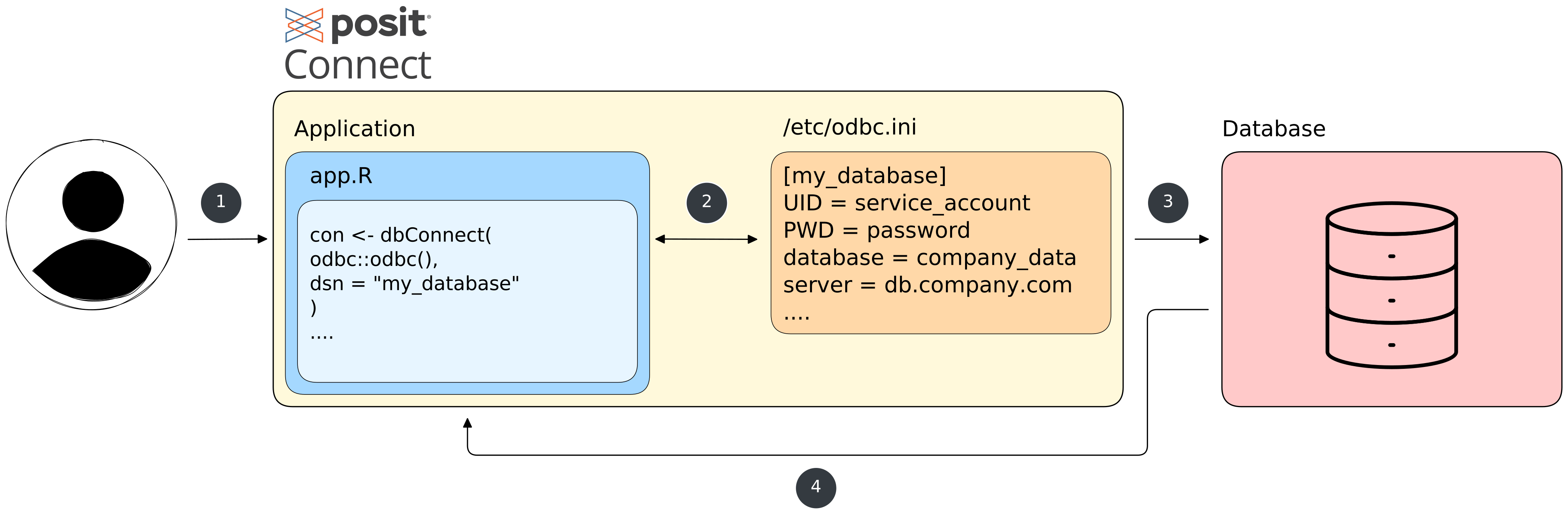
- The user launch the content on Posit Connect, that contains code to connect to a database using a DSN.
- The content code uses the DSN to connect to the database.
- The ODBC driver uses the service account credentials stored in the DSN to authenticate to the database.
- The database returns the requested data to the content.
Going deeper
Lab 1 at the end of this section will walk you through setting up a PostgreSQL connection using the Posit Pro Drivers, and a DSN used in a Shiny app.
The Database Connection Reference provides a comprehensive overview of database connections including driver installation, DSN configuration, and code examples for R and Python.
Posit Connect, by default, shares connections across an R or Python process to improve performance. However, if you have security concerns around data access, developers should consider forcing each connection to a single process by changing the runtime setting Max connections per process to 1.
Pattern 2: OAuth with User Credentials
When to use
- Interactive applications requiring personalized data views
- Strong data governance requirements
- Individual user accountability needed
Setup overview
- OAuth application Admins set up OAuth integration on the vendor side and provide the details to Posit Connect Admins (client ID, secret, scopes, redirect URIs)
- Posit Connect Admins configure OAuth integration in the admin panel
- Developers (Connect Publishers) use integration in their code
- Users authenticate on first access; tokens and permissions are managed automatically
Authentication Flow Example
Figure 3 below illustrates the authentication flow for this pattern.
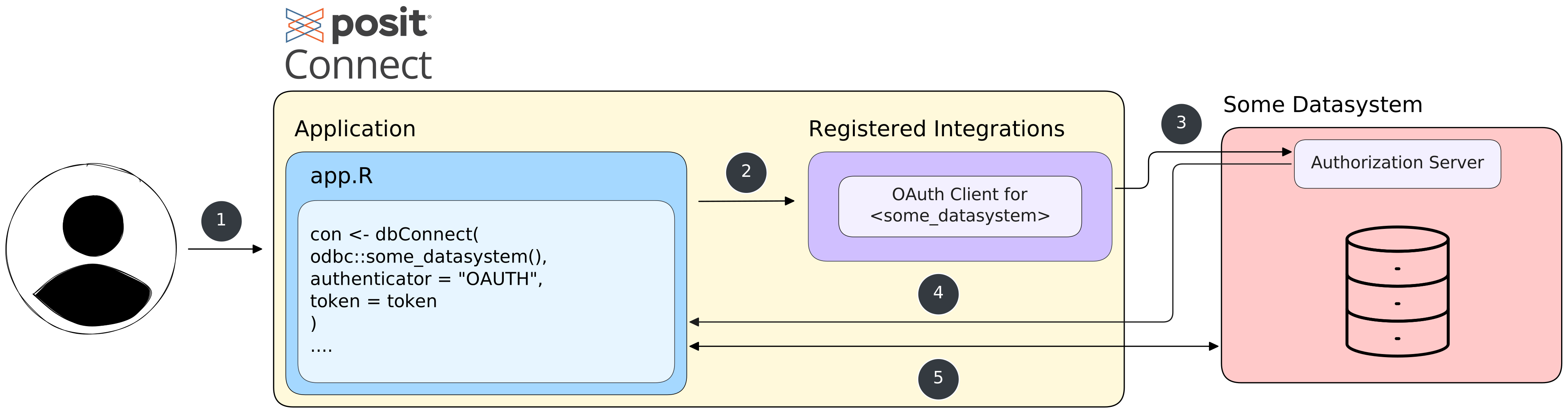
- The user launches interactive content on Posit Connect that contains code to access data provided by one of the supported integrations.
- The content uses the OAuth integration configured in Posit Connect
- The integration allows the user to authenticate to the data source (if not already authenticated) and retrieves an access token.
- The content code uses the access token to authenticate to the data source.
- The data source returns the requested data to the content.
Pattern 3: Cloud Storage with Service Principal
When to use
- Accessing files in AWS S3, Azure Blob Storage, or Google Cloud Storage
- Shared data access for all users
- Large file storage outside database systems (e.g., Parquet files)
Setup overview
- Create service principal or IAM role in cloud provider
- Configure credentials as environment variables in Connect
- Developers use cloud SDK in their code which reads credentials from environment variables
Authentication Flow Example
Figure 4 below illustrates the authentication flow for this pattern using global environment variables. A similar approach using content-level environment variables can also be used.
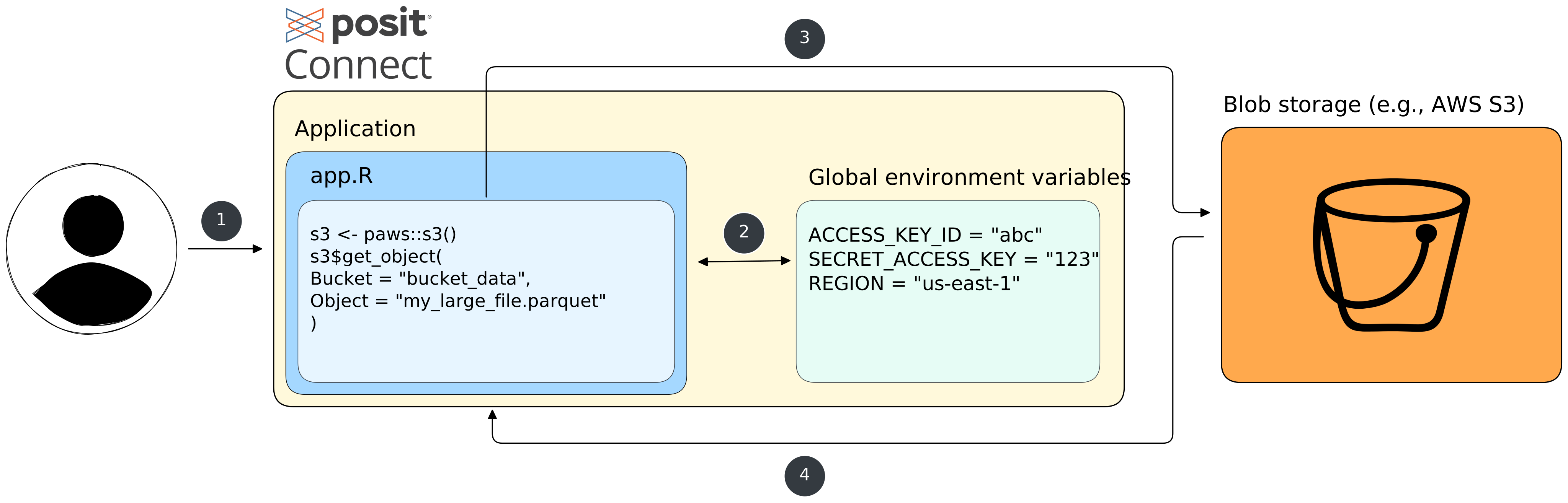
- The user launch the content on Posit Connect, that contains code to connect to a cloud blob storage provider (e.g., AWS S3).
- The content code retrieves credentials from environment variables set in the Connect server environment (available to all content).
- The content code uses the retrieved credentials to authenticate to the provider.
- The data is returned to be used by the content.
Pattern 4: Pins for Data Sharing
When to use
- Sharing data between R/Python projects
- Versioned data artifacts
- Lightweight data sharing without database infrastructure
Setup overview
- Configure Pin board and decide where to host it (Connect, S3, Azure, or local)
- Publisher writes Pins with appropriate permissions
- Consumers read Pins using board configuration
Authentication Flow Example
Figure 5 below illustrates the authentication flow for this pattern using a Pin hosted in AWS S3. In this example, the credentials to access the Pin board are stored as content-level environment variables.
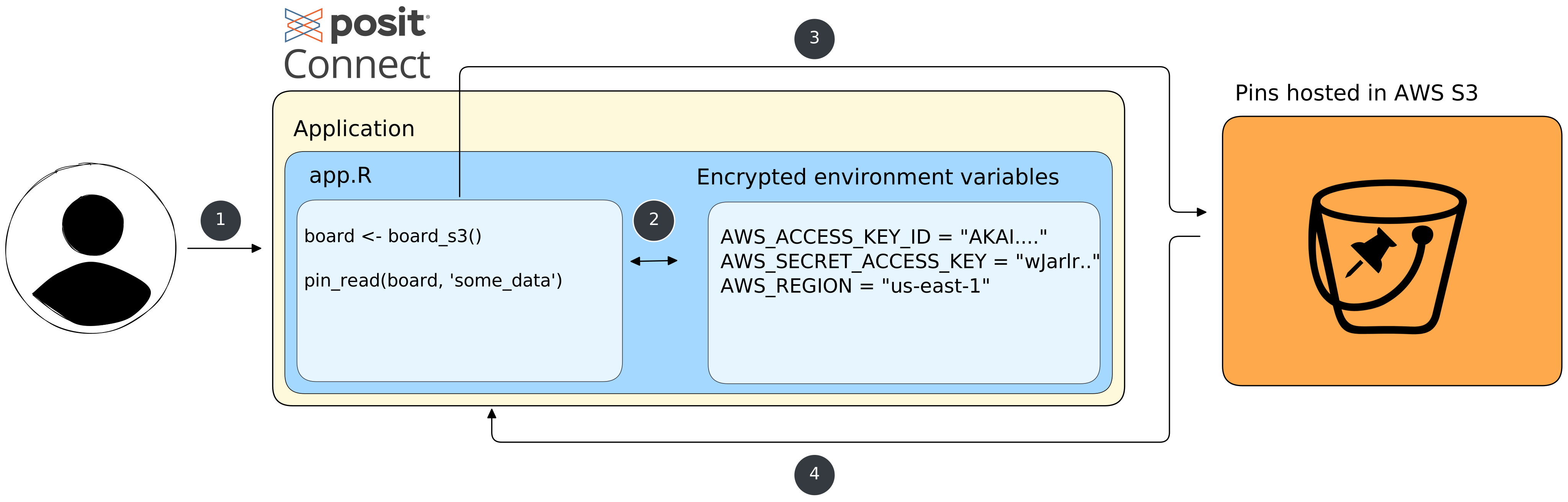
- The user launch the content on Posit Connect that contains code to read a pin from an S3-hosted pins board.
- The content code decrypts and injects the stored AWS credentials into the application’s runtime environment.
- Using the credentials, the application makes an authenticated request to AWS S3 to retrieve the pinned data.
- AWS S3 validates the credentials and returns the requested pin data back to the application running on Connect.
This example uses a Pins board hosted in AWS S3. However, the authentication flow would be different if the board was hosted on the same Connect server. When using board_connect() for pins stored on the same Connect server, no credentials are required. Connect automatically injects CONNECT_SERVER and CONNECT_API_KEY environment variables at runtime.
It would also be possible to leverage the OAuth integration with AWS to authenticate the user automatically to the appropriate S3 bucket, following a flow similar to the one illustrated in Figure 3.
Going deeper
For more information, you can consult the pins websites for R and Python:
Pattern 5: File System Access
When to use
- Very large files that cannot be stored elsewhere (often a last resort solution)
- Specific file formats not supported by other methods
- Legacy systems requiring file-based access
Setup overview
- Mount file share or create directory on Connect server
- Set appropriate file permissions for Service account user (rendered content, e.g. reports) or Current user execution (interactive content, e.g., Shiny apps)
- Use absolute file paths in your code
Important considerations
- Paths may differ between development and production
- Requires manual permission management
- Limited sharing capabilities
Authentication Flow Examples
To illustrate the two ways to access files on the server, we provide two authentication flow diagrams: one for service account user access (Figure 6) and one for current user execution (Figure 7). The former is suitable for scheduled reports or automated jobs, while the latter is ideal for interactive applications requiring user-specific data access.
Note that here we are using a file system access example, but both service account user and current user execution can also be used for other data access types. For instance, database connections can be configured to use a per-user odbc.ini configuration file, and other data sources can be configured to leverage the user permissions.
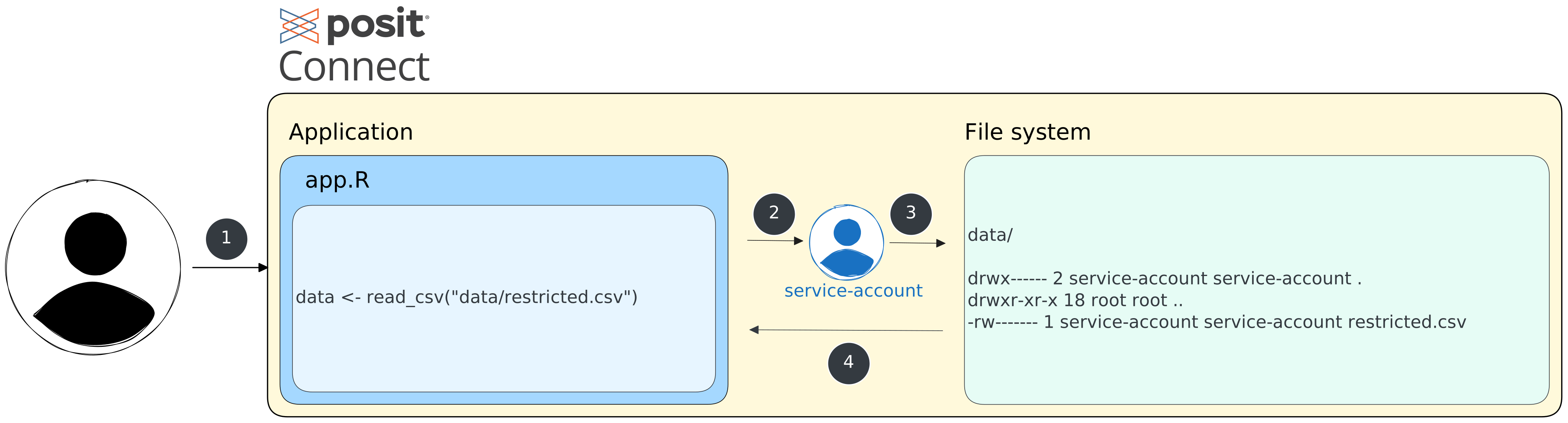
- The user launch the content on Posit Connect, that contains code to access files on the server.
- The content runs under a dedicated Linux user account with specific, isolated permissions.
- The content code accesses files on the server using the permissions of the service account user.
- The content retrieves the requested files.
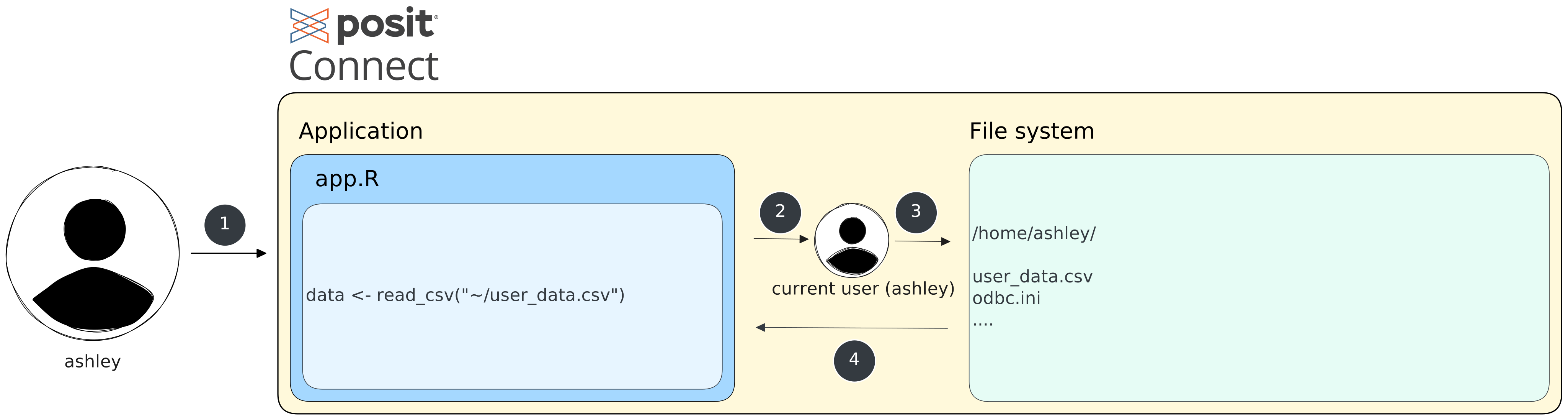
- The user launch the interactive content on Posit Connect, that contains code to access files on the server (for instance, inside their home directory).
- The content runs under the Linux user account of the viewer.
- The content code accesses files on the server using the Linux permissions of the current user.
- The content retrieves the requested files.
Strategy Selection Guide
Regardless of the data access method you use, there might be multiple ways to authenticate to it. The right mechanism depends on your data source and authentication strategy. Here we explore different mechanisms to help you choose the most appropriate one for your use case.
First, not all credential management mechanisms work with all data sources. Use this table to identify valid options for your use case:
| Data Source | DSN | Content Env Vars | Server Env Vars | Service Account User | Current User Execution | OAuth Integration |
|---|---|---|---|---|---|---|
| Databases (PostgreSQL, SQL Server, etc.) | 🟢 | 🟡 | 🟡 | 🟡 | 🟡 | 🟢¹ |
| Data Lakehouses (Databricks, Snowflake) | 🟡 | 🟡 | 🟡 | 🔴 | 🔴 | 🟢 |
| Cloud Storage (AWS S3, Azure Blob, GCS) | 🔴 | 🟡 | 🟡 | 🟡 | 🟡 | 🟢 |
| Pins | 🔴 | 🟡 | 🟡 | 🟡² | 🟡² | 🟢² |
| File System | 🔴 | 🔴 | 🔴 | 🟢 | 🟢 | 🔴 |
🟢 = Recommended | 🟡 = Supported | 🔴 = Not applicable or not recommended
Notes:
¹ Cloud-hosted databases (AWS RDS, Azure SQL, Cloud SQL) can use their platform’s OAuth integration for IAM-based authentication. Traditional on-premise databases typically use username/password stored in environment variables or DSNs.
² Depends on the board type: Connect boards use API keys via environment variables. Cloud-based boards (S3, Azure, GCS) inherit the authentication options of their underlying cloud storage platform, including OAuth.
To help you choose the right authentication mechanism, the tables below summarize each mechanism along with its compatibility, best use cases, advantages, and disadvantages.
| Mechanism | Best Used When | Advantages | Disadvantages |
|---|---|---|---|
| Data Source Name (DSN) | - Multiple applications using same database - Standardized connections |
- Centralized configuration - Simplified connection code |
- Less visibility for developers - Server admin required |
| Content Env Vars | - Customized access requirements - Prototype development - One-off analyses |
- Maximum flexibility - Developer autonomy |
- Potential security risks - Inconsistent implementation |
| Server Env Vars | - Server-wide secrets - API keys or tokens used across applications |
- Consistent across applications - Centralized management |
- All applications have same access - Less granular control |
| Service account users | - Scheduled reports/jobs - Automated processes - Content requiring specific permissions |
- Predictable permissions - Isolation between applications |
- Additional account management - Potential security concerns |
| Current user execution | - Interactive applications requiring user context - Row-level security implementations |
- Inherits user permissions - Strong security model |
- Additional setup complexity - Limited to interactive content |
| OAuth Integrations | - Cloud data platforms (e.g., Databricks, Snowflake) - User-specific data access - Short-lived credential requirements |
- Automated token management - No secrets in code - User or service account options |
- Initial setup complexity - Limited to OAuth-enabled services |
To explore in detail the configuration of each mechanism as well as security recommendations for dealing with credentials, refer to the Implementation Reference.
Lab: Database Connection with Pro Drivers
In this lab, you will:
- Install Posit Professional Drivers for PostgreSQL
- Configure a system-wide DSN
- Test the connection from R and Python
- Deploy content that uses the DSN
The goal of this lab is to deploy a Shiny app that connects to a PostgreSQL database using a system DSN configured on the Connect server. The app visualizes synthetic on-time flight performance data.
The database server is hosted on localhost, the database is named ontime, and the connection uses the following credentials: username posit, password password. The Shiny application uses a DSN named ontime_db to connect to the database.
Using the instructions found in the Pro Drivers Installation guide, install the Posit Professional ODBC Drivers on your Posit Connect server. Make sure to follow the instructions to create the
/etc/odbcinst.inifile which contains the driver names and locations.Install
odbcinstwithsudo apt install odbcinstto check that the drivers for PostgreSQL have been installed correctly by running the following commands that list the names of the installed drivers (you should see[PostgreSQL]in the output). This step is optional but recommended to verify the installation.odbcinst -q -dCreate a system DSN named
ontime_dbusing the PostgreSQL driver, by adding the database connection information provided above to the file/etc/odbc.iniTipHint/etc/odbc.ini
[ontime_db]
Driver = PostgreSQL
Server = localhost
Port = 5432
Database = ontime
UID = posit
PWD = password
Go to the web interface of your Posit Connect server, log in as
ashley(username and password are “ashley”), and click on the “Publish” button. Select “Import from Git”, use:https://github.com/fmichonneau/ontime_demofor the URL. Choose “main” for the branch, click on “Next”. Keep “app” as the directory containing themanifest.jsonfile, enter a title for this application (such as “On Time App”) and click “Publish”. This typically takes 3-5 minutes to build and deploy the application.Once the deployment is successful, if you configured the DSN correctly, you should be able to launch the Shiny application and see the data visualizations.
Check your understanding
What are two limitations of including data inside content bundles when deploying to Posit Connect?
What are three key decisions to make when setting up external data access in Posit Connect?
When would you choose user credentials over a service account for data access?
What is a DSN and when is it typically used in Posit Connect data access patterns?
Any two of the following:
- Data can only be refreshed when content is redeployed (deployment coupling)
- Data cannot be shared across projects without duplication
- Increases server disk space usage (storage overhead)
- What data source to use, (2) who authenticates (user credentials vs. service account), and (3) how credentials are managed (OAuth, DSN, environment variables, etc.).
User credentials are recommended when:
- Data sensitivity is high
- Personalized/user-specific data views are required
- Individual accountability is needed for auditing
- Strict data governance or compliance requirements exist
- Building interactive dashboards where users should only see data they’re authorized to access
A DSN (Data Source Name) is a centralized configuration for database connections, managed with ODBC drivers, typically used when multiple applications need to connect to the same database using shared service account credentials.
Additional Resources
Now that you have a better understanding of data access in Posit Connect, you can explore the following guides: