Posit Connect Administration
This course will provide you with the information to install and configure a single server installation of Posit Connect.
- Provide you with a mental model of how Posit Connect operates
- Provide insights into how users utilize Posit Connect and how to support them
- Practice typical installation tasks for a Posit Connect administrator
- Highlight some best practices and strategies for the configuration of Posit Connect
Time Commitment
Going through the entire training should take between 2 and 6 hours depending on your level of experience working with the command line and the topics covered in the documentation.
The labs are independent of each other and the training can be completed over the course of several days.
Pre-requisites
The course assumes you have some experience with Linux. Specifically, you will need to be comfortable:
- Executing Linux commands
- Navigating the file system from the terminal
- Edit configuration files using vim or nano
- Access and read server logs
Training Structure
This course starts with a general introduction to Posit Connect that focuses on what is Connect and how data science teams use it. After, you will go through a series of hands-on labs that guide you through the steps required to install and configure Posit Connect.
Each section starts with required reading from the Admin Guide documentation. This reading helps you get familiar with the structure and content of the Admin Guide that you will rely on regularly as an Admin of the Posit products. We recommend you go through the required reading and read through all the hands-on lab instructions before doing the hands-on labs.
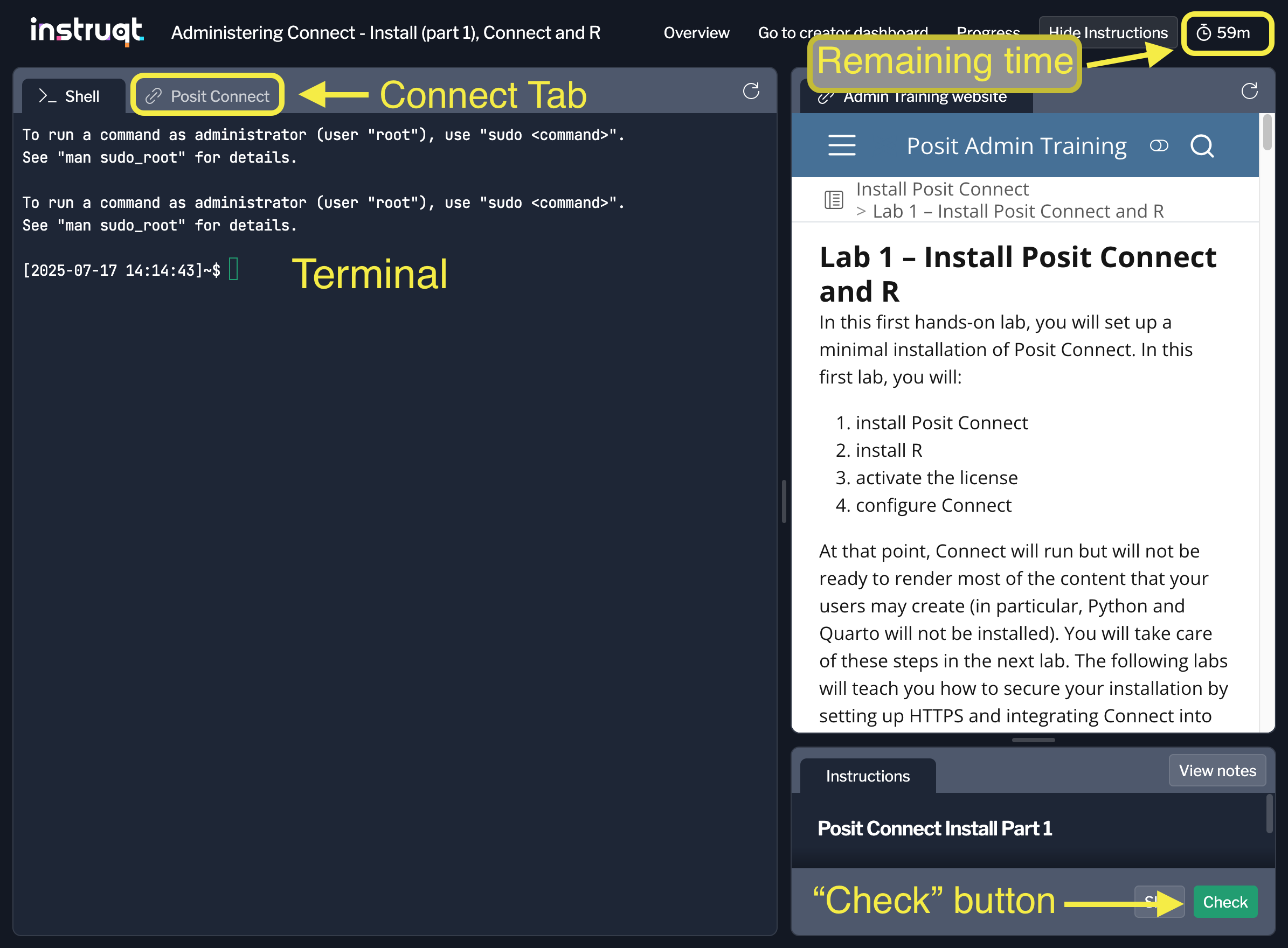
The hands-on labs are hosted on Instruqt. For each lab, you will have access to:
- a terminal to interact with a virtual machine running Ubuntu 24.04
- a tab will give you access to your installation of Posit Connect (once you have installed and configured it correctly)
- the website for this training
- a timer that indicates how much time you have left before the session runs out.
Once you completed all the assignments listed in a lab, clicking the “Check” button (bottom right), will run a script that verifies that it is the case, and record your progress.
Content Overview
- Introduction
- Install
- Lesson 1 – Installation Overview
- Lab 1 – Install Posit Connect and R
- Lesson 2 – Building a Complete Data Science Environment
- Lab 2 – Install System Dependencies, Python, and Quarto
- Lesson 3 – Securing Access with HTTPS
- Lab 3 – Setting up HTTPS
- Lesson 4 – Integrating Connect with Your Authentication System
- Lab 4 – Setting up Authentication
- Lesson 5 – Configuring Repositories and Deploying Content
- Lab 5 – Setting up Repositories and Deploying Content
- Summary and Next steps - Now that you better understand how to set up Connect, this provides you with an overview of things you need to prepare to install Connect on your systems.
- Posit Connect Administration
Documentation
Posit Connect has several guides geared towards different user personas and subject matter. The Admin Guide is the primary guide to reference for matters related to managing a Posit Connect deployment. For a complete list of available documentation for Posit Connect, visit the All Documentation section of the Posit documentation site.
The Posit Connect user interface also has a Documentation section accessible from the left sidebar.
Admin Guide
The Admin Guide is the best resource on Posit Connect for administrators. We encourage you to use this training as an opportunity to get comfortable using this reference! As you go through the labs included in this training, you will be asked to read sections of the Admin Guide to become familiar with its content.
User Guide
The User Guide is more for users of Posit Connect, however, there are many subjects that crossover with the Admin Guide. We encourage you to read through it to better understand how the users you support use Connect so you can support them better.
Additional Resources
For Connect, we also provide additional resources that can be helpful to you as an admin:
- The How-to Guides are step-by-step procedures for common Posit Connect workflows such deploying a Quarto Report that access data on Databricks.
- The Cookbook provides scripts in R and Python, using the Connect SDK to interact and work with your Connect server.
- The API Reference documents the Connect’s API.
As an Admin, you will be spending lots of time with product documentation. Be sure to bookmark these links and familiarize yourself with the different guides.
Next steps
In the next lesson, you will learn more information about Connect and how it supports data science teams.