What is Posit Package Manager? How Does It Support Data Science Teams?
In this section, you will learn:
- What Posit Package Manager is and how data science teams rely on it
- The repository and source model that system administrators need to manage
- How Package Manager retrieves packages through the Posit Package Service
- The deployment architectures available and how to choose between them
- How Package Manager helps you govern security, licensing, and reproducibility
- Reading time: 25 minutes
- Documentation reading time: 15 minutes
- Hands-on exercise time: 0 minutes
Not all the features described in this training might be available in your product tier. Check with your Customer Success Manager if you have any questions.
Overview of Posit Package Manager
Posit Package Manager organizes and centralizes the R and Python packages that your teams depend on, giving data scientists reliable access to packages while giving IT control and visibility over what enters the organization.
Packages reach an organization from many sources: CRAN and Bioconductor for R, PyPI for Python, Open VSX for VS Code and Positron extensions, GitHub, and the internal packages your own teams develop. Left ungoverned, this is hard to secure, slow to install on Linux, and difficult to reproduce months later. Package Manager turns these many sources into a managed set of repositories that your users point their tools at, the same way they would point at CRAN or PyPI directly (Figure 1).
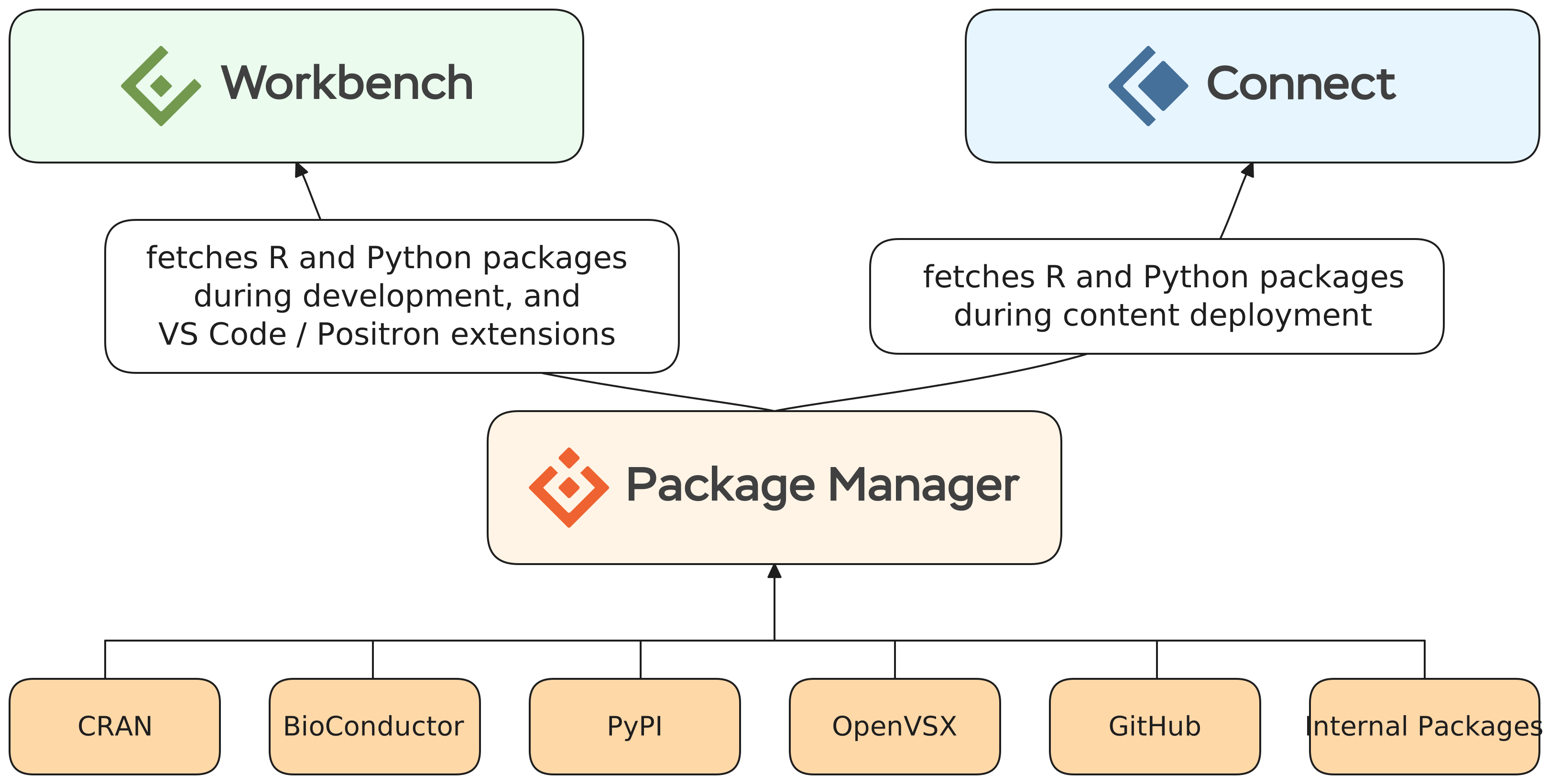
We recommend configuring Package Manager before the other Posit products, because both Posit Workbench and Posit Connect depend on a fast, governed source of packages. Configuring it first means that as soon as users start working in Workbench or publishing to Connect, they already have a trustworthy place to get their packages.
How Do Data Science Teams Use Posit Package Manager?
As a system administrator, understanding how data science teams consume packages helps you anticipate their needs and the questions other teams will ask you. Your responsibilities will include deciding which repositories to offer, governing which packages are allowed, and keeping installs fast and reproducible. This knowledge also helps you communicate with your security and operations teams, who will want to know what is in use and whether anything has a known vulnerability.
Data science teams use Package Manager as the single place their tools retrieve packages. Rather than reaching out to CRAN or PyPI over the public internet, an R user runs install.packages() and a Python user runs pip install against a repository URL you provide. To the client, a Package Manager repository looks exactly like the public repository it replaces, so no change in workflow is required.
Package Manager solves several problems that data science teams encounter:
- Faster installs on Linux. CRAN does not ship pre-built binaries for Linux, so installing a package on a Linux server (including Workbench and Connect) normally means compiling from source, which can take many minutes or hours. Package Manager serves pre-built Linux binaries, dramatically reducing installation time.
- Reproducibility. Code that runs today must still run in six months. Package Manager keeps time-stamped snapshots of each source, so teams can freeze a repository to a past date and integrate it with tools like
renvto reconstruct the exact set of packages used in an analysis. - Internal package distribution. When teams build shared internal packages, Package Manager gives you a supported, governed way to distribute them, with automatic version archiving.
- Access in firewalled and air-gapped environments. In regulated industries, production servers often cannot reach CRAN or PyPI directly. Package Manager acts as an internal source, so users get seamless package access without the server needing internet connectivity.
If you want to dive deeper into Package Manager, we offer the “What is Package Manager?” course on Posit Academy, which goes into more detail on the problems Package Manager solves for data scientists.
Repositories and Sources
Two concepts underpin everything in Package Manager:
- A source is a collection of package files from one place, for example CRAN, PyPI, Bioconductor, Open VSX, a Git repository, or a set of internally developed packages. Package Manager tracks every change to a source and groups changes into snapshots, building a full versioned history.
- A repository is the view your users actually point their tools at. A repository subscribes to one or more sources, and to the client it appears as a single collection of packages served over HTTP.
Package Manager supports four repository types, each matching the interface a client expects:
- R: A CRAN-like repository served to
install.packages(),renv, andremotes. - Bioconductor: A repository compatible with
BiocManagerfor the bioinformatics ecosystem. - Python: A repository implementing the PyPI interface (PEP 503) used by pip, poetry, and similar tools.
- VSX: A gallery of VS Code extensions compatible with VS Code, Positron, and other VS Code-based editors.
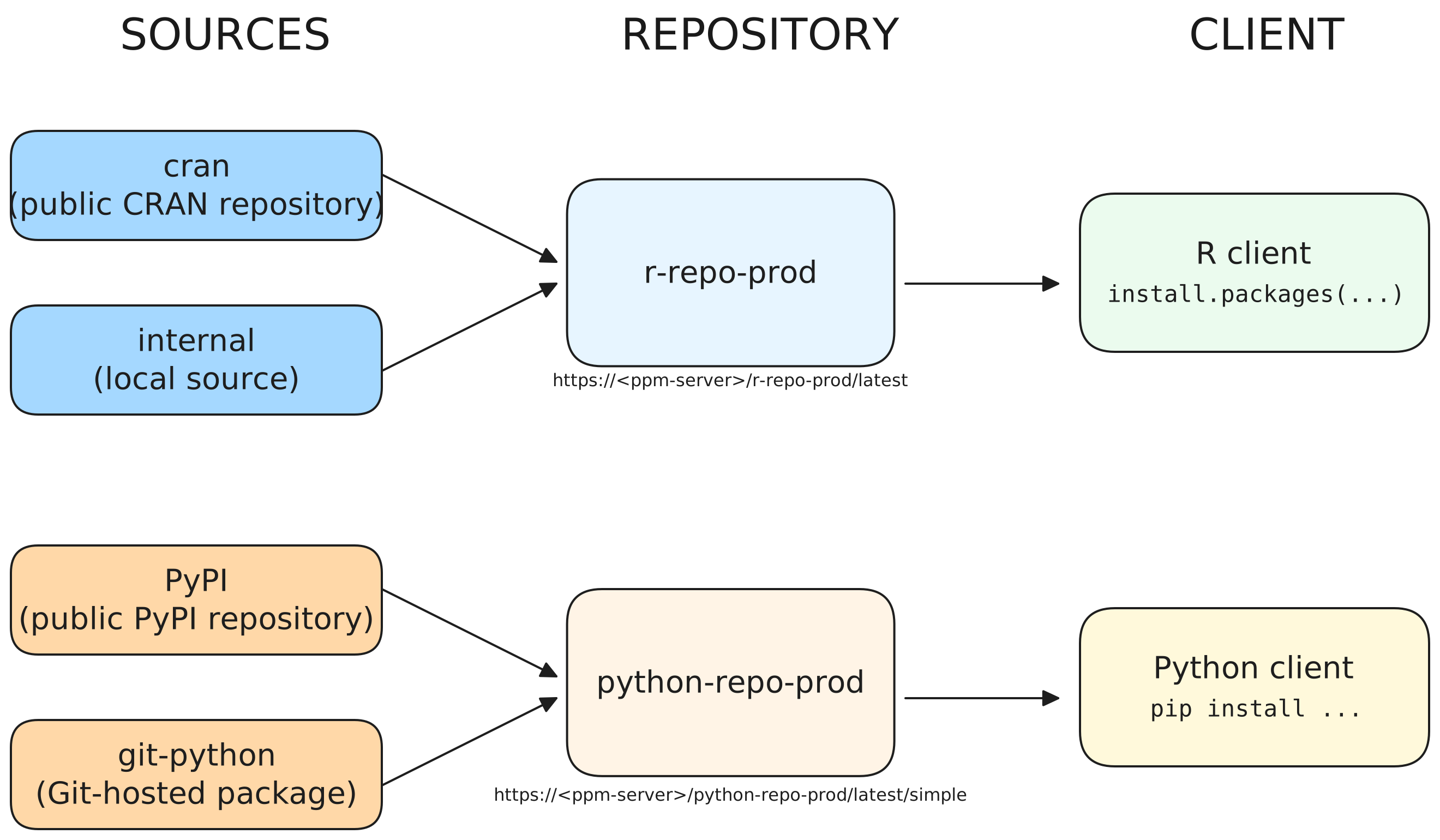
A repository can combine multiple compatible sources. For example, a single R repository can subscribe to both the public CRAN source and an internal source, so users get CRAN packages and your own internal packages from one URL (Figure 2). When a package name exists in more than one source, Package Manager resolves the conflict by source order, which lets an internal package take precedence over its public counterpart.
Repository versioning lets you reference a repository as it existed on a particular date. Because Posit publishes a new snapshot of CRAN, Bioconductor, PyPI, and Open VSX each business day, you can freeze a repository URL to a date and be confident the same packages are served later. This is the foundation for reproducible environments and pairs naturally with renv.
How Package Manager Gets Its Packages: The Posit Package Service
Understanding where Package Manager gets its data clarifies your network requirements and explains why a fresh install is fast and small on disk rather than mirroring all of CRAN up front.
Package Manager does not download packages directly from CRAN, Bioconductor, PyPI, or Open VSX. Instead, Posit maintains a content delivery network (CDN), the Posit Package Service, that serves package files, metadata, and vulnerability data. Your Package Manager instance synchronizes metadata from this service and fetches the actual package files on demand as users request them, caching each version after the first download (Figure 3).
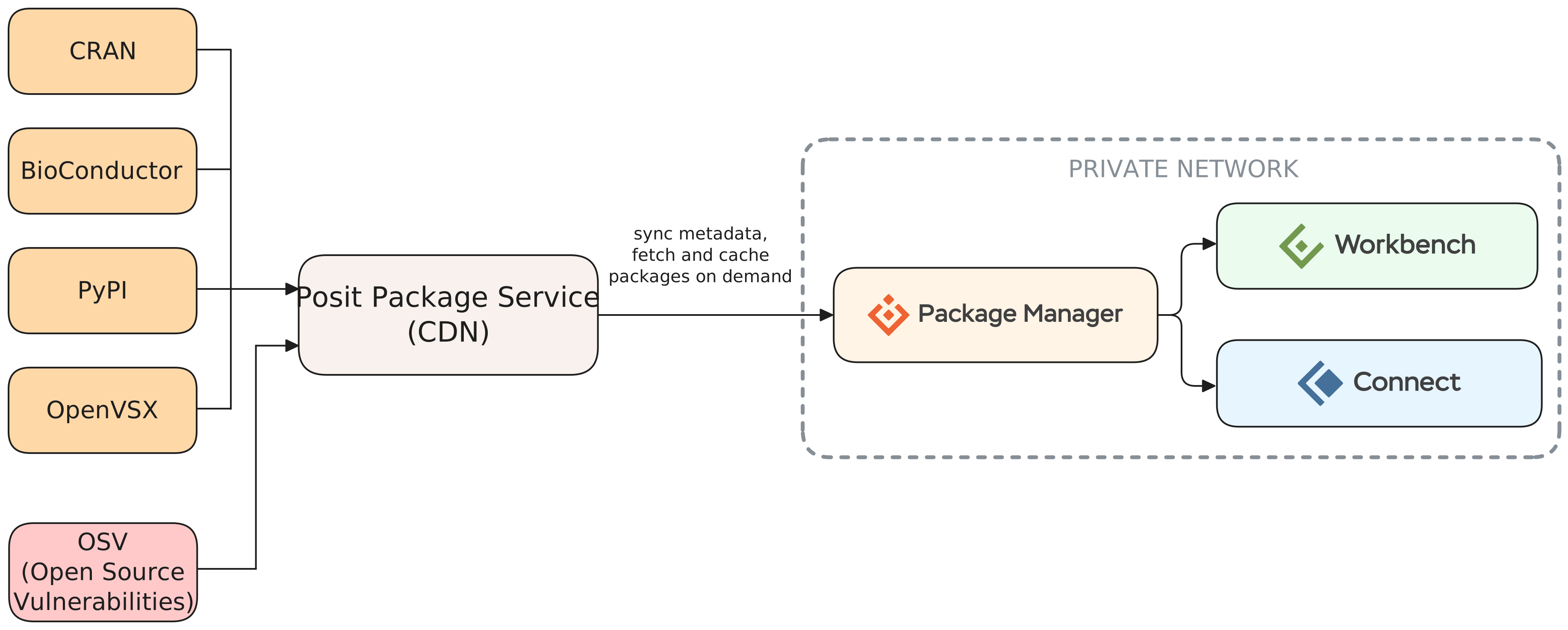
This on-demand model keeps the disk and bandwidth footprint small for connected installations. The Package Manager team evaluates CRAN, Bioconductor, PyPI, and Open VSX each business day and publishes new snapshots, which connected instances pick up automatically (every 10 minutes by default).
For high-security environments that cannot reach the Posit Package Service even through an outbound proxy, Package Manager can run fully air-gapped. In that case all required data is downloaded up front using an offline downloader and transferred into the isolated network, which requires considerably more storage.
Posit Package Manager Architecture Overview
Choosing the right architecture, and the right hardware, determines how reliably Package Manager serves your users and how much operational complexity you take on. Disk space, not CPU or RAM, is usually the dominant consideration.
Package Manager focuses on storing and organizing packages, so disk space is typically the most important resource. As a starting point, Posit suggests a minimum non-production configuration of 2 cores, 4 GB of RAM, and at least 100 GB of disk, and a recommended production configuration of 4 cores, 16 GB of RAM, and at least 500 GB of disk. Enabling features such as Bioconductor, Linux binaries, PyPI mirroring, or many Git builders increases these requirements. Air-gapped environments typically need at least 250 GB of additional storage because all data is downloaded in advance.
Package Manager is supported on Linux (Ubuntu, RHEL, and SLES/openSUSE) and runs as the unprivileged rstudio-pm user, with root required only to install the product, manage its service, and activate its license. Regardless of the architecture you choose, Package Manager requires its own dedicated server and must not be co-located with other Posit products such as Workbench or Connect. In a full Posit Team deployment, install it first, so that Workbench and Connect can depend on it as their package repository from the moment they come online. Package Manager supports three deployment architectures:
Single server: The simplest architecture and how most teams get started. Package Manager runs on one Linux server with local storage. If you do not need high availability, scaling this server vertically is an effective strategy. Available at the Basic tier.
Load-balanced cluster: Two or more nodes behind a load balancer, backed by shared storage and an external PostgreSQL database, providing high availability and additional throughput. Requires the Enhanced tier.
Kubernetes: Package Manager deployed into a Kubernetes cluster using Helm charts, suited to organizations that already standardize on container orchestration. This architecture also supports high availability. Requires the Advanced tier and familiarity with Docker, Kubernetes, and Helm.
The guiding principle is to choose the simplest architecture that meets your current and near-term needs, then add complexity only as required.
To learn more about the architectures available for Posit Package Manager, see:
Governing Security and Licensing
Your security and compliance teams will ask what packages are in use, whether any have known vulnerabilities, and whether package licenses are acceptable. Package Manager gives you tools to answer and enforce these policies before a package ever reaches a user’s session.
Package Manager reports known security vulnerabilities for CRAN, Bioconductor, and PyPI packages using data from the Open Source Vulnerabilities (OSV) database, displaying any associated CVEs on the relevant package pages. Importantly, Package Manager does not run its own scanning; it surfaces vulnerability data published upstream.
Beyond reporting, administrators can enforce policy with blocklist rules. These rules can block packages by name, by version range, by license (for example, blocking AGPL-licensed packages), or by vulnerability severity. Rules can apply globally or to specific sources and repositories, and exceptions allow you to permit individual packages. When a user tries to download a blocked package, Package Manager returns an HTTP 403 and logs the event. The depth of blocking depends on your license tier: the Enhanced tier supports blocking all known vulnerabilities, while the Advanced tier adds fine-grained control by severity, license, source, and repository.
Package Manager also supports single sign-on through OpenID Connect (OIDC), and authenticated repositories that restrict access to users with an API token.
Server and CLI
Once installed, Package Manager has two parts you will interact with:
Package Manager service runs as the
rstudio-pmservice in systemd: the long-running server that serves packages to your users.rspmCLI is the client that connects to the running server to administer it. You can use it, for instance, to create repositories, add sources, and manage tokens. You can run the CLI on the same server as the service, or you can install it on a different machine and authenticate to your server with an API token, which can be useful for automation and CI/CD.
The Database
Package Manager stores its metadata (the repositories, sources, and packages you configure, along with usage data) in a database. It supports two providers:
- SQLite is the default and requires no setup. The database lives on local storage under the data directory, and it is a good fit for the single-server installation you will build in this course.
- PostgreSQL is required for the more complex deployments described in the architecture section above but can also be used for more robust single-server deployments. It requires more setup and maintenance but can provide better performance and reliability as your usage grows.
Documentation
Posit Package Manager has several guides geared towards different user personas and subject matter. The Admin Guide is the primary guide to reference for matters related to managing a Posit Package Manager deployment. For a complete list of available documentation for Posit Package Manager, visit the All Documentation section of the Posit documentation site.
Admin Guide
The Admin Guide is the best resource on Posit Package Manager for administrators. We encourage you to use this training as an opportunity to get comfortable using this reference! As you go through the labs included in this training, you will be asked to read sections of the Admin Guide to become familiar with its content.
User Guide
The User Guide is more for users of Posit Package Manager, however, there are many subjects that crossover with the Admin Guide. We encourage you to read through it to better understand how the users you support use Package Manager so you can support them better.
Additional Resources
For Package Manager, we also provide additional resources that can be helpful to you as an admin:
- Posit Public Package Manager is a free, hosted instance of Package Manager you can use as a reference for how repositories appear to your users.
- The API Reference documents the Package Manager API, which you can use to automate administrative tasks.
As an Admin, you will be spending lots of time with product documentation. Be sure to bookmark these links and familiarize yourself with the different guides.
- Posit Package Manager centralizes R, Python, Bioconductor, Open VSX, Git, and internal packages into governed repositories that clients use just like CRAN or PyPI.
- The repository-and-source model is the core mental model: sources collect files from one place, and repositories subscribe to sources to present a single view to users.
- Package Manager retrieves data from the Posit Package Service on demand rather than mirroring everything, and can run fully air-gapped when required.
- It serves pre-built Linux binaries to make installs fast, and keeps time-stamped snapshots that enable reproducible environments with
renv. - Single-server, load-balanced, and Kubernetes architectures trade simplicity for availability and scale.
- Vulnerability reporting (via OSV) and blocklist rules let administrators govern security and licensing before packages reach users.
Next Steps
In the next chapter, you will install Posit Package Manager on a virtual machine. Before this, take some time to reflect on what you have learned in this chapter and how it applies to the installation on your infrastructure.
After going through this section, can you answer these questions?
- Which package ecosystems (R, Python, Bioconductor, VS Code extensions) do your users need?
- Will your Package Manager instance have outbound internet access, or does it need to run air-gapped?
- Do you need to speak to other teams (Security, Networking, etc.) before installing or configuring this product?
- What questions do you have about the features or functions of this product?