A fork of the Snakemake Language extension for VS Code with additions for Positron: running Snakemake pipelines and following them live, locally or as Posit Workbench jobs. Everything below the Positron section is upstream’s documentation and applies unchanged.
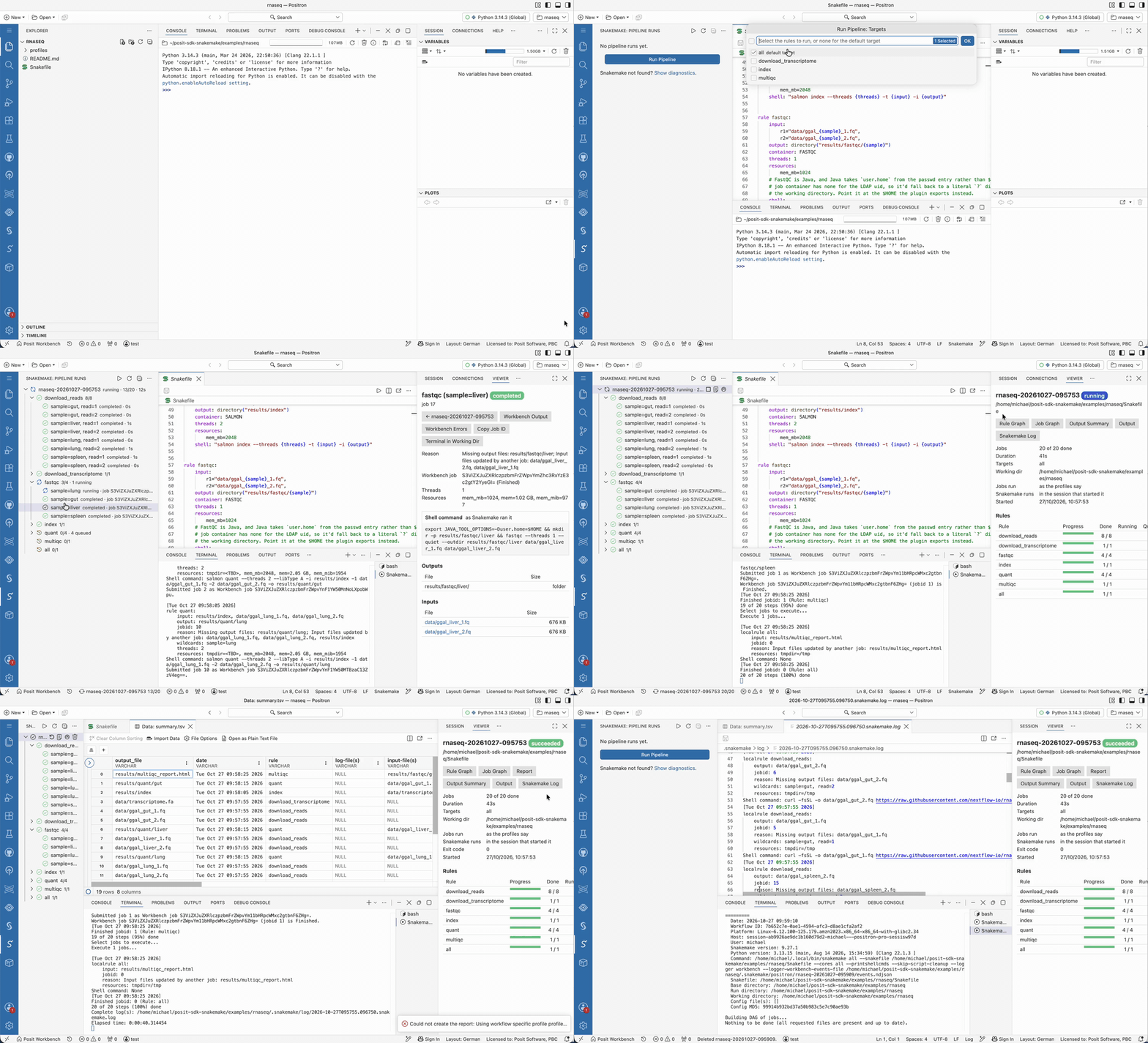
Watch the full demo (2 min):
Positron
In Positron the extension adds:
- Run and manage pipelines. The Pipeline Runs view in the Snakemake sidebar runs a workflow (the ▶ button on a Snakefile, or Snakemake: Run Pipeline…). It asks for the targets, a profile, config overrides or files, and, with the workbench executor plugin installed, whether the jobs run in the session or as Workbench jobs, on which cluster and resource profile. It then follows the run live, per rule and job.
- Stop a run (Snakemake cancels its jobs, including Workbench jobs, as Ctrl+C would), Stop After Running Jobs Finish, or Force Kill it. Run Again builds what is still missing or out of date; Run Again, Rerunning Incomplete Jobs adds
--rerun-incomplete. - Dry Run Pipeline… shows the jobs Snakemake would run, per rule, without running them.
- A run that failed because the working directory is locked, or because outputs are incomplete, offers Unlock or Rerun Incomplete right in the tree.
- Click a job to open its dashboard in the Viewer: its rule, wildcards, reason, resources, shell command, log files, benchmark (time, peak memory, CPU, I/O), outputs and inputs (HTML outputs open in the Viewer, with a button back to the job), and for Workbench jobs the job’s own stdout and stderr. A run’s dashboard shows per-rule progress, and failed jobs with the end of their logs.
- Debug Job in Console for a
script:job runs the preamble Snakemake generated for it in the R or Python console, which defines the job’ssnakemakeobject (snakemake.input,snakemake.wildcards, …) in the job’s working directory, and opens the script to step through. - Cancel a single Workbench job.
- Show the rule graph (live, coloured by progress) and the job graph in the run’s dashboard, with a way back to the run, create Snakemake’s report and open it in the Viewer (with a button back to the run), and open the output summary (
--detailed-summary) or a benchmark file in the Data Explorer. - Lint Workflow, Unlock Working Directory, and Delete Workflow Outputs… (temporary or all, after a preview).
- Runs keep going when the window is reloaded or closed, and are picked up again by the next window. Each run’s output and events are in
.snakemake/positron/<run name>/under its working directory. - Headless runs on Posit Workbench: Run Pipeline can start Snakemake itself as a Workbench Job (“As a Workbench Job”), so the run keeps going when the session is suspended or stopped, and a later session picks it up. Stop and Force Kill stop the job; Workbench jobs it leaves behind are cancelled by the run’s tag. See the
snakemake.run.driverandsnakemake.run.headless.*settings. A run inside the session itself stops when the session is suspended.
- Stop a run (Snakemake cancels its jobs, including Workbench jobs, as Ctrl+C would), Stop After Running Jobs Finish, or Force Kill it. Run Again builds what is still missing or out of date; Run Again, Rerunning Incomplete Jobs adds
- Assistant integration. Posit Assistant can list runs, explain why a run failed (from each failed job’s logs and Snakemake’s errors), and launch (or dry-run) or stop a run after you approve it. The extension gives it a
snakemake-runsskill and agent-compatible commands (snakemake.positron.assistant.*), which it runs with itspositronCommandtool; assistants that use VS Code language model tools, such as Copilot, get the same assnakemake_*tools. - Run code in the console. A Snakefile is Python: press Cmd/Ctrl+Enter to run the current line or selection in the Python console, or Cmd/Ctrl+Shift+Enter to run the rule’s
run:block around the cursor. - Open in Data Explorer. Right-click a CSV/TSV file, such as a sample sheet or a benchmark, and choose Open in Data Explorer.
In VS Code the extension behaves like upstream.
Requirements
- Snakemake 9 or later. The extension uses the
snakemakeof the Python interpreter selected in Positron, a.venvin the workspace, or the one on thePATH; setsnakemake.run.executableto choose another. - For live job status and Workbench jobs: posit-sdk-snakemake 0.3.0 or later, installed into the same environment as Snakemake (
pip install "git+https://github.com/sol-eng/posit-sdk-snakemake@v0.3.0"). It provides the workbench logger plugin (live events) and the workbench executor plugin (--executor workbench), and needs nothing beyond Snakemake. Without it, runs work locally and job status is read from Snakemake’s output. - On Posit Workbench, the extension talks to the Workbench API itself, with the session’s credentials, to list clusters and to submit, follow and stop Snakemake’s own job (headless runs) and the jobs a run leaves behind. Outside Workbench it uses
WORKBENCH_SERVERandWORKBENCH_API_KEYif they are set. A server certificate from a private CA is read fromREQUESTS_CA_BUNDLE,SSL_CERT_FILEorNODE_EXTRA_CA_CERTS. - Snakemake: Show Run Diagnostics shows what the extension found.
The extension ID is posit.positron-snakemake. It contributes the same language, grammars and snippets as snakemake.snakemake-lang, so it stays inactive, and offers to uninstall that extension, while both are installed.
To install, build the VSIX with make and install positron-snakemake.vsix, or run make install. Settings for runs are under snakemake.run.*.
Snakemake Language Support
Provides basic language support for Snakemake files (Snakefile, *.smk). Feedback, suggestions, and contributions are very welcome!
This project has been started by Peter Alping, and can be considered a fork of this repository.
Features
- Syntax definitions based on Python, with added Snakemake keywords
- Language rules based on Python
- Snippets
Example
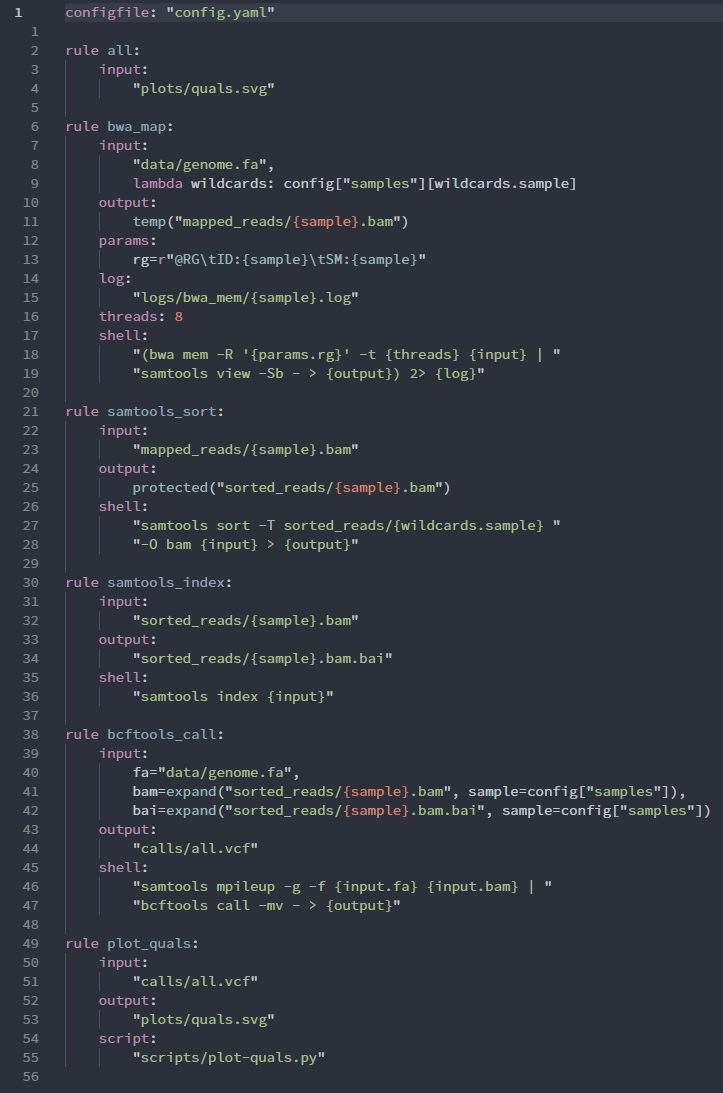
Example taken from Snakemake documentation.