A fork of the Nextflow extension for VS Code with additions for Positron. Everything below the Positron section is upstream’s documentation and applies unchanged.
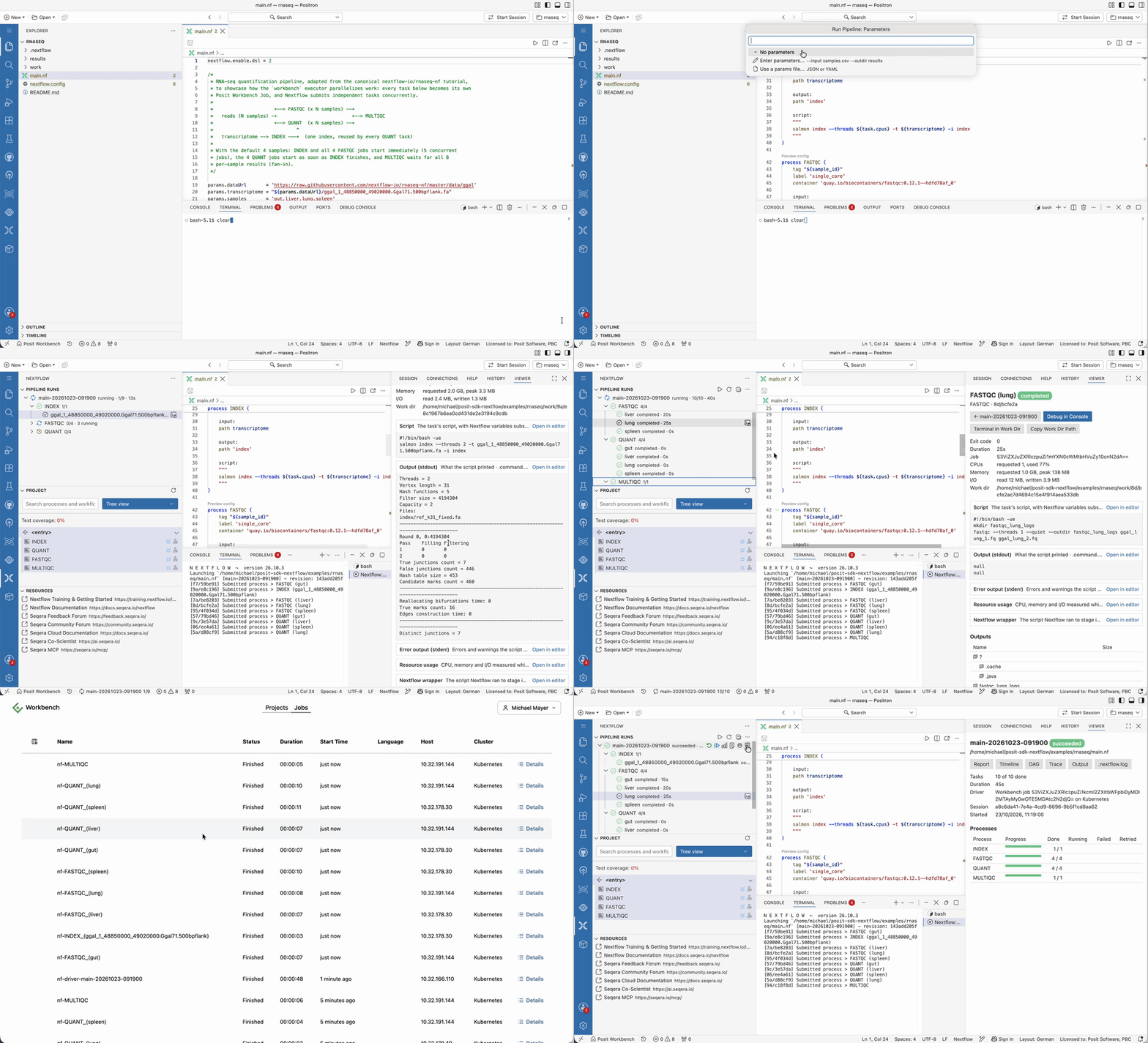
Watch the full demo (2 min):
Positron
In Positron the extension adds:
- Run and manage pipelines. The Pipeline Runs view in the Nextflow sidebar runs a pipeline (the ▶ button on a
.nffile, or Nextflow: Run Pipeline…), asking for the profiles, parameters and, when the pipeline uses the nf-workbench executor, the Posit Workbench cluster and resource profile. It then follows the run live, per process and task.- Stop a run (Nextflow cancels its tasks, including Workbench jobs), Force Kill it, Resume it from its cached tasks, Run Again, or Clean its work directories. Delete Run removes one or more selected runs together with their logs, reports and work directories; published results are kept.
- Click a task to open its dashboard in the Viewer: its status and resource use, its logs and script as labelled sections, and its outputs and inputs (HTML outputs such as FastQC reports open in the Viewer, with a button back to the task). A run’s dashboard button shows per-process progress and failed tasks with their errors.
- Cancel a single task, open the files in its work directory, or Debug Task in Console. This sets the R or Python console’s working directory to the task’s work directory, where its inputs are staged, and opens the task’s resolved script, with Nextflow variables substituted, to step through.
- Open a run’s report, timeline and DAG in the Viewer, with a button back to the run’s dashboard, and its trace in the Data Explorer. The DAG is drawn with the bundled mermaid, so it also works without internet access.
- Runs keep going when the window is reloaded or closed, and are picked up again by the next window. Each run’s logs and reports are in
.nextflow/positron/<run name>/under its launch directory. - Headless runs on Posit Workbench: Run Pipeline can start Nextflow itself as a Workbench Job (“As a Workbench Job”), so the run keeps going when the session is suspended or stopped, and a later session picks it up. The job runs in the session’s image by default and submits the pipeline’s tasks with Workbench credentials of its own, which last 7 days. Stop and Force Kill stop the job; task jobs it leaves behind are cancelled. See the
nextflow.run.driverandnextflow.run.headless.*settings. A run inside the session itself stops when the session is suspended. - Live task status needs the
nf-workbenchplugin (0.2.0 or later, withworkbench.eventsFile), which the extension loads for every run, whatever the executor. Without it, only completed tasks are shown. Nextflow: Show Run Diagnostics shows what the extension found: Nextflow, Java, the plugin, and whether the Workbench API accepts the session’s credentials. - On Posit Workbench, the extension talks to the Workbench API itself, with the session’s credentials, to list clusters, submit, follow and stop headless driver jobs, and cancel task jobs. With nf-workbench 0.4.0 or later, the plugin does the same for task jobs, so no launcher CLI or Python environment is needed. A server certificate from a private CA is read from
REQUESTS_CA_BUNDLE,SSL_CERT_FILEorNODE_EXTRA_CA_CERTS.
- Assistant integration. Posit Assistant can list runs, explain why a run failed (from each failed task’s stderr), and launch, resume or stop a run after you approve it. The extension gives it a
nextflow-runsskill and agent-compatible commands (nextflow.positron.assistant.*), which it runs with itspositronCommandtool; assistants that use VS Code language model tools, such as Copilot, get the same asnextflow_*tools. - DAG preview in the Viewer. The workflow DAG preview opens in the Viewer pane instead of an editor tab.
- Run R and Python process scripts in the console. Inside a process script that starts with an
Rscriptorpythonshebang, press Cmd/Ctrl+Enter to run the current line or selection, or Cmd/Ctrl+Shift+Enter to run the whole script. The shebang is skipped and Nextflow string escapes such as\$are undone. Nextflow variables like${x}are sent as written, so define them in the console first. - Open in Data Explorer. Right-click a trace file (
execution_trace_*.txt) or a CSV/TSV file such as a samplesheet and choose Open in Data Explorer. Trace files are opened as a snapshot; open them again to see a running pipeline’s progress. - Seqera Cloud login with an access token. The browser login returns to VS Code rather than Positron, so the login asks for a personal access token instead.
In VS Code the extension behaves like upstream.
The extension ID is posit.positron-nextflow. It contributes the same languages, settings and commands as the official nextflow.nextflow extension, so it stays inactive, and offers to uninstall the official extension, while both are installed.
To install, build the VSIX with make and install build/positron-nextflow.vsix, or run make install. Running pipelines needs Nextflow 25.10 or later; Nextflow: Install Nextflow installs it into ~/.local/bin. Settings for runs are under nextflow.run.*.
VS Code extension for Nextflow that provides language support for Nextflow scripts and config files.
Features
Nextflow language server
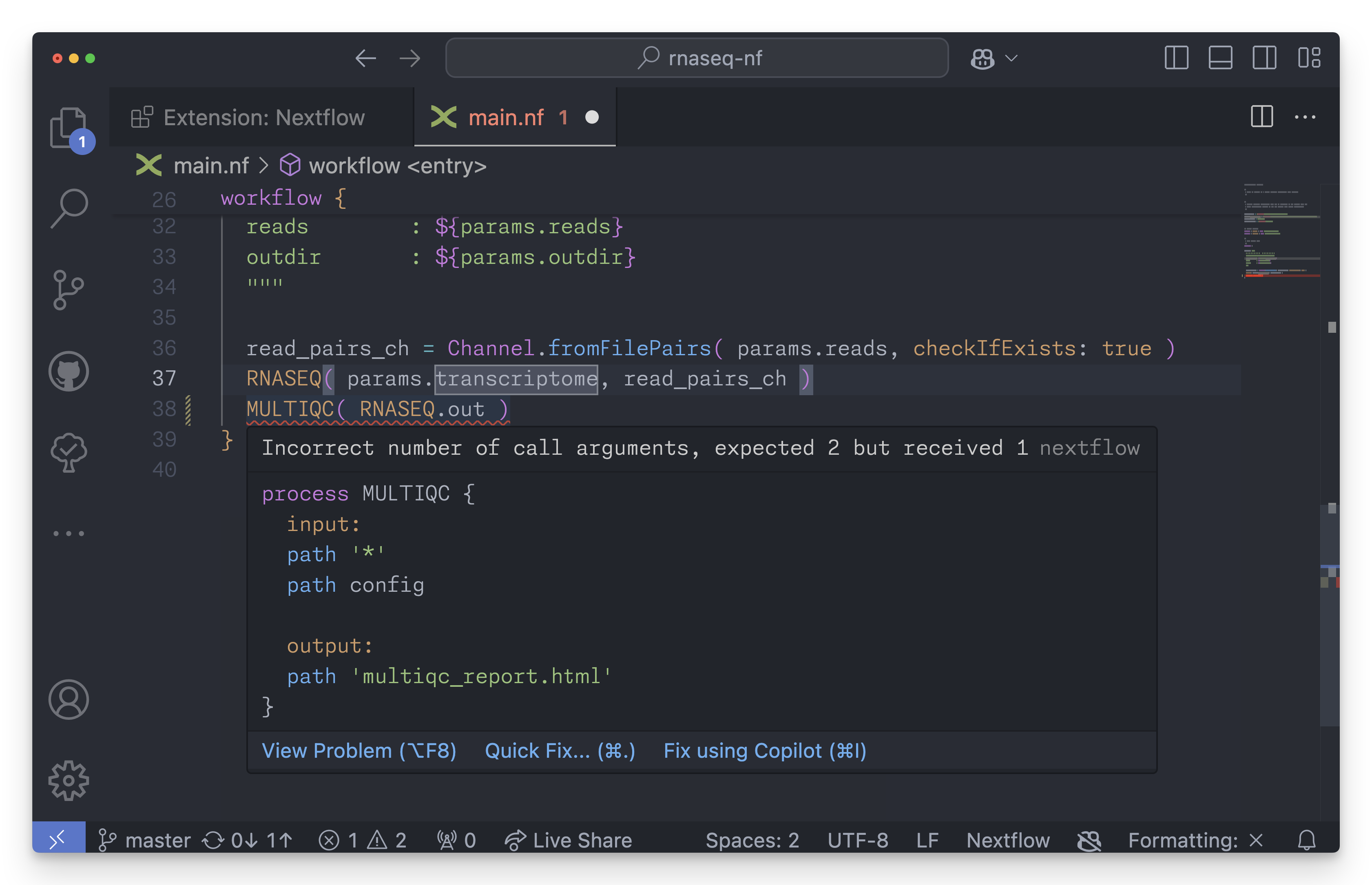
The extension uses the Nextflow language server to provide code intelligence:
- Syntax highlighting
- Code navigation (outline, go to definition, find references)
- Code completion
- Diagnostics (errors, warnings)
- Formatting
- Hover hints
- Rename
- DAG preview for workflows
- Config preview for processes
Read the Nextflow documentation for more information about the Nextflow language server.
Related blog posts:
- Modernizing the Nextflow Developer Experience (Part 1): The IDE
- Modernizing the Nextflow Developer Experience (Part 2): The Language Server
Project view
The extension provides a custom view for Nextflow projects. The Project view uses the language server to provide an overview of your pipeline project:
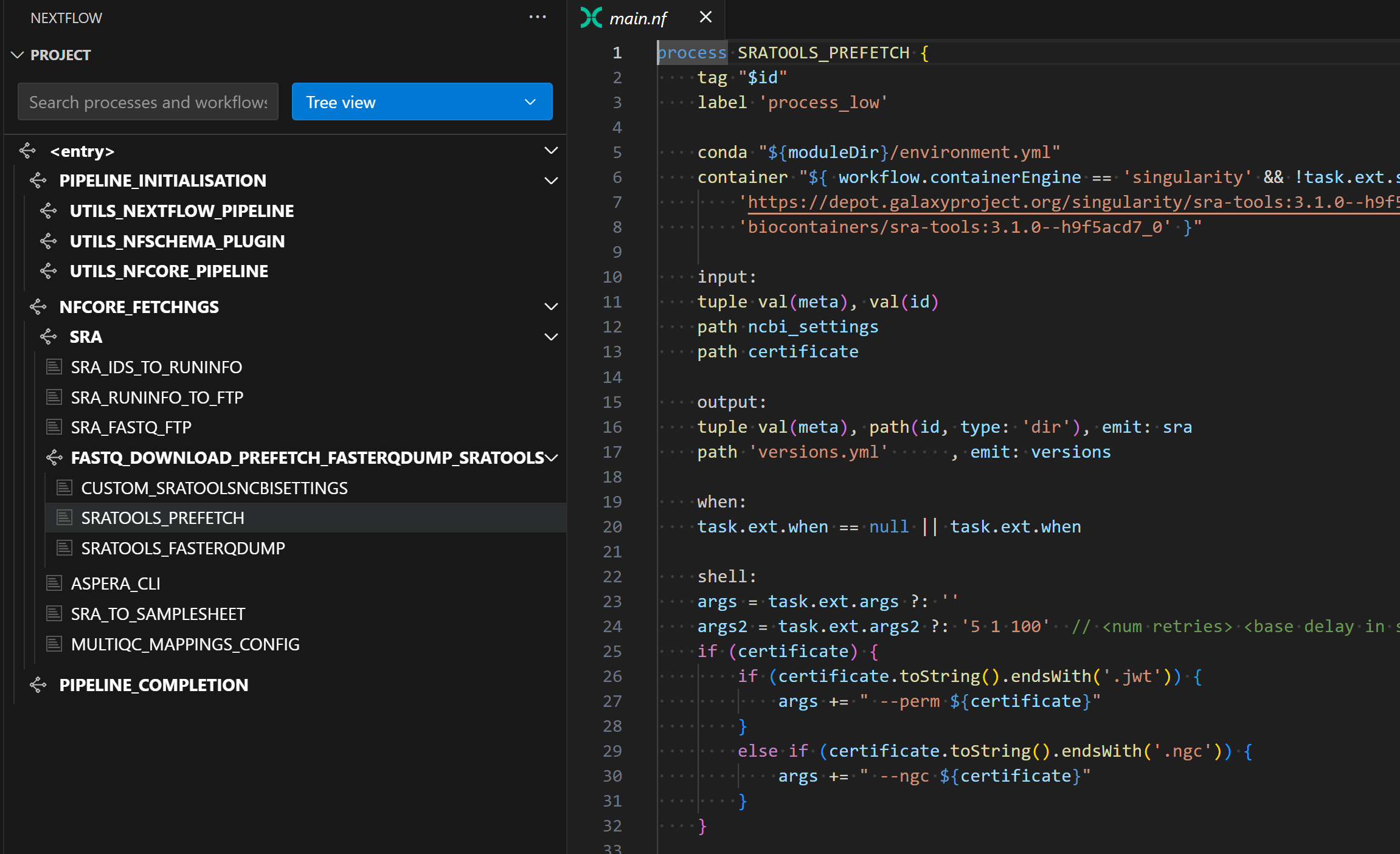
Example taken from the nf-core/fetchngs pipeline.
The Project view allows you to:
- See the structure of your pipeline
- Navigate to a process, workflow, or test by name
- Monitor test coverage across your entire pipeline
- View and/or generate nf-tests for a process
- Build a Wave container for a process
Copilot for Nextflow
The Copilot extension for Seqera AI has been removed. Use Seqera Co-Scientist instead.
Installation
This extension is available in the Visual Studio Marketplace and the Open VSX Registry.
Requirements
On Linux (x64 and arm64) and macOS (Apple silicon), the extension downloads a standalone build of the language server that includes its own Java runtime, so Java is not required.
On other platforms, such as Windows and Intel-based Macs, the extension uses the language server jar, which requires Java 17 or later.
Note: for custom Java installations such as conda, you might need to set the nextflow.java.home extension setting for the extension to find your Java installation.
Offline usage
The extension downloads an appropriate version of the language server from GitHub based on the nextflow.languageVersion extension setting. To use the language server in an offline environment, you must download a language server release manually and save it in the local cache directory used by the extension. For example, the standalone build for Linux (x64):
VERSION=26.10.1
mkdir -p ~/.nextflow/lsp/v26.10
wget https://github.com/nextflow-io/language-server/releases/download/v${VERSION}/nextflow-language-server-${VERSION}-linux-x64.tar.gz
tar -xzf nextflow-language-server-${VERSION}-linux-x64.tar.gz -C ~/.nextflow/lsp/v26.10
Or the jar:
mkdir -p ~/.nextflow/lsp/v24.10
wget https://github.com/nextflow-io/language-server/releases/download/v24.10.0/language-server-all.jar -O ~/.nextflow/lsp/v24.10/v24.10.0.jar
The extension will fall back to the latest patch version from the local cache if it can’t download from GitHub.
Note: Nextflow language server patch versions have no correlation to Nextflow patch versions. Always use the latest patch version of the language server when downloading a release manually.
Commands
Open the command palette and type Nextflow to see the list of available commands.
Configuration
The following settings are available:
-
nextflow.completion.extended: Provide auto-completions from outside the current script. If an external completion is selected, it will be automatically included into the current script. -
nextflow.completion.maxItems: The maximum number of auto-completions to suggest at a time. -
nextflow.debug: Enable debug logging and debug information in hover hints. -
nextflow.errorReportingMode: Set the desired level of error reporting. -
nextflow.files.exclude: Folders that should be excluded when scanning the workspace for Nextflow files. -
nextflow.formatting.harshilAlignment: Use the Harshil Alignment™️ when formatting Nextflow scripts and config files.Note: not all rules are supported.
-
nextflow.formatting.maheshForm: Place process outputs at the end of the process body when formatting Nextflow scripts. -
nextflow.formatting.sortDeclarations: Sort script declarations when formatting Nextflow scripts. -
nextflow.java.home: Specify the folder path to the desired Java runtime. Equivalent to theJAVA_HOMEenvironment variable, i.e. the Java binary should be located at$JAVA_HOME/bin/java. Use this setting if the extension cannot find Java automatically. Only used on platforms where the language server is run from the jar (e.g. Windows, Intel-based Macs). -
nextflow.languageVersion: Nextflow language version to be used by the language server. -
nextflow.log.debugOpacity: Opacity applied toDEBUGandTRACEentries in.nextflow.logfiles. Set to1.0to disable dimming. -
nextflow.log.filter.enabled: Enable filtering by log level. Logs are read-only when filtered. -
nextflow.log.filter.hiddenLevels: Log levels to hide in.nextflow.logfiles when filtering is enabled. The file on disk is unchanged. Can be toggled per-file in the editor title bar. -
nextflow.log.filter.stripAnsi: Remove ANSI escape codes (e.g.\u001b[0;32m) from.nextflow.logfiles when filtering is enabled. The file on disk is unchanged. Can be toggled per-file in the editor title bar. -
nextflow.telemetry.enabled: Enable usage data to be sent to Seqera. See below for more information about what we do and do not collect.
Telemetry notice
We (Seqera) collect limited usage data through this extension to help us understand which features are most valuable and improve your overall experience.
This telemetry is opt-in and can be enabled or disabled at any time by toggling “Nextflow > Telemetry: Enabled” in your VS Code settings.
Information we collect
- Commands: We track when you invoke a command provided by this extension, but not the contents of that command (e.g. user-supplied arguments).
- File events: We track when you open a Nextflow file, but not the file name or its contents.
- Environment info: We collect your operating system type, VS Code version, and the extension version to help diagnose issues and guide future development.
Information we do not collect
- Chat contents: We do not collect any text you enter into the chat panel.
- File contents: We do not collect any source code, file paths, or any other file contents.
- Personal info: We do not collect project names, directory paths, or any personally identifiable information.
If you have any questions or concerns, feel free to open an issue in our repository. We appreciate your trust and feedback!